10 Best Marvel Rivals Best Sens for 800 Dpi: Top Picks Compared
If you are trying to keep your aim steady in Marvel Rivals, mouse sensitivity can make a big difference. Many players use 800 DPI, but the right setting still depends on how you play and which hero you pick. This guide on marvel rivals best sens for 800 dpi is for players who want smoother tracking, cleaner flicks, and more control in fights.
It also helps anyone who feels their aim is too fast, too slow, or hard to repeat. In this review, you will see how the product handles aiming comfort, setup, and in-game control.
We will also cover who it suits best, what stands out, and where it may fall short.
Find the Perfect Aim Settings for 800 DPI in Marvel Rivals
| Image | Product | Price |
|---|---|---|
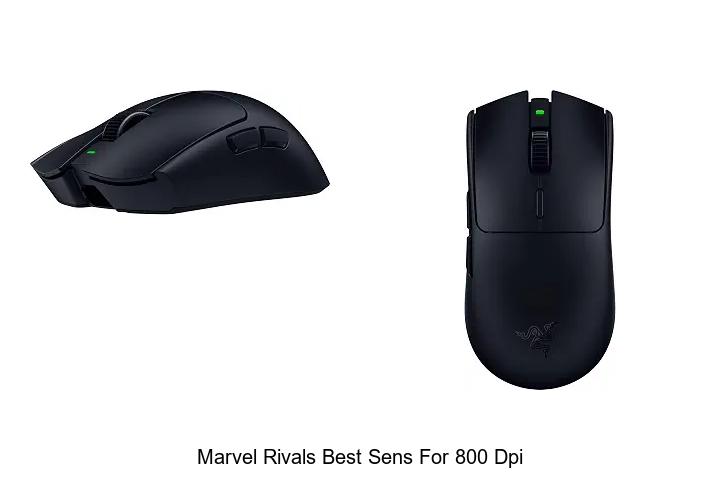
Pick 1  | Razer Viper V4 Pro Wireless Gaming Mouse | Check Price On Amazon |
Pick 2  | Razer Viper V3 HyperSpeed Wireless Gaming Mouse | Check Price On Amazon |
Pick 3  | Razer Basilisk V3 Gaming Mouse | Check Price On Amazon |
1. Razer Viper V4 Pro Wireless Gaming Mouse
Competitive aim feels lighter and faster with Razer’s 49g wireless design. The Viper V4 Pro Wireless Gaming Mouse targets esports players who want speed, control, and low-latency responsiveness.
Built with input from pro players, it pairs a 50K DPI optical sensor with true 8000 Hz polling and Frame Sync support. That combination helps fast flicks feel precise, while the optical scroll wheel and Gen-4 optical switches add consistent control. The shape is right-handed, and the low weight helps reduce fatigue during long sessions.
Battery life reaches up to 180 hours at 1000 Hz, or 45 hours at 8000 Hz. The mouse feels focused on performance first, with Synapse 4 offering fine sensitivity adjustments. It suits players who value accuracy, speed, and a competitive wireless setup.
Pros
- Extremely light 49g build
- True 8000 Hz polling support
- High-precision 50K DPI sensor
Cons
- Right-handed shape only
- Fewer buttons than MMO mice
- Battery life drops at 8000 Hz
Who Should Buy It?
Buy it if you want a lightweight wireless mouse for competitive play. It fits esports players who care about fast tracking, low latency, and precise aiming. The right-handed shape and pro-focused design suit PC gamers who prefer a lighter feel and advanced customization.
It also works well for players who want strong performance at 800 or 1000 DPI settings.
Key Specifications
| Specification | Details |
|---|---|
| Sensor | Focus Pro 50K DPI Optical Sensor Gen-3 |
| Connectivity | 2.4Ghz Wireless, Wired USB Type C |
| DPI Range | Up to 50K DPI |
| Polling Rate | Up to 8000 Hz |
| Buttons | 6 |
| Weight | 49 g |
| Battery Life | Up to 180 hours at 1000 Hz; up to 45 hours at 8000 Hz |
| Hand Orientation | Right |
| Latency | 55% lower latency |
| Special Features | 49g ultra lightweight, Frame Sync Technology, optical scroll wheel, optical switches Gen-4, DPI Sensitivity Matcher |
The Focus Pro 50K DPI optical sensor gives very fine cursor control. It tracks up to 930 inches per second and 90 G acceleration. That means quick hand movements stay readable on screen. The mouse also supports 1-DPI step adjustments through Synapse 4. For everyday play, that helps users match their sensitivity more closely. Frame Sync aligns sensor data with the PC for cleaner input. The result is precise motion for fast aiming and controlled tracking.
A 49g body changes how the mouse feels during long matches. The lighter weight helps reduce strain while making fast swipes easier. True 8000 Hz polling raises responsiveness, though battery life drops to 45 hours at that setting. At 1000 Hz, runtime reaches 180 hours. The optical scroll wheel and Gen-4 optical switches add consistency and durability. Right-handed players get a shape built for competitive grip comfort and quick reaction use.
2. Razer Viper V3 HyperSpeed Wireless Gaming Mouse
Wireless freedom meets a lightweight shape built for competitive mouse control. The Razer Viper V3 HyperSpeed keeps the focus on fast, steady swipes and long battery life.
It uses an 82g body, a Focus Pro 30K optical sensor, and up to 280 hours of battery life. The sensor sits farther forward, which can help tracking feel more precise on different surfaces, including glass. HyperSpeed wireless aims for a low-latency connection in busy wireless spaces.
The mouse also includes mechanical Gen-2 switches, six buttons, and on-mouse DPI control with five stages.
Build quality feels practical rather than flashy, with a centered design that suits competitive play. The AA battery format keeps setup simple and travel friendly.
At 82 grams, it should feel quick in fast aim adjustments without getting too heavy during long sessions. It also supports both Mac and PC hardware, which adds flexibility.
For players wanting wireless value, strong sensor specs, and very long battery life, it is a smart pick.
Pros
- Lightweight 82g body feels quick in fast swipes.
- Long battery life reduces charging interruptions.
- High-end sensor supports precise tracking on many surfaces.
Cons
- AA battery design may feel less premium.
- Six buttons may suit some setups better than others.
- On-mouse DPI steps may feel limited for fine tuning.
Who Should Buy It?
Buy this if you want a wireless gaming mouse with strong tracking and long battery life. It suits players who value fast movement, simple setup, and a lighter feel for competitive sessions. The sensor, battery life, and low-latency wireless connection make it a good match for PC gamers who want dependable performance without a heavy mouse.
Key Specifications
| Specification | Details |
|---|---|
| Sensor | Focus Pro 30K optical sensor |
| Connectivity | USB wireless |
| DPI Range | Up to 30,000 DPI |
| Buttons | 6 |
| Weight | 82 g |
| Battery Life | Up to 280 hours |
| Hand Orientation | Ambidextrous |
| Latency | Low-latency HyperSpeed wireless |
| Special Features | On-mouse DPI control, mechanical Gen-2 switches, wireless |
The Focus Pro 30K optical sensor gives the mouse its main tracking strength. Its forward placement helps movement feel more controlled across different surfaces. The 30,000 DPI ceiling gives plenty of sensitivity range for many play styles. Six buttons keep the layout simple, while ambidextrous shaping broadens who can use it comfortably. The included AA battery powers the wireless design, and the centered weight distribution supports steady hand movements during long sessions.
HyperSpeed wireless is made for low-latency input in busy setups. That matters for players who want responsive aim without cable drag. Up to 280 hours of battery life also lowers maintenance during extended use. Mechanical Gen-2 switches add crisp button feel and long-term durability through a 60-million click rating. On-mouse DPI control makes sensitivity changes quick, which helps if different games or roles need different settings. The mouse suits gamers who want simple control and dependable wireless performance.
3. Razer Basilisk V3 Gaming Mouse
A wired mouse can feel like the safest choice for steady aim and consistent control. The Basilisk V3 leans into that idea with a right-handed ergonomic shape and a thumb rest. Its form supports the hand well, which helps during longer play sessions.
Eleven programmable buttons add useful control for macros, push-to-talk, and quick actions. The Focus Plus 26K optical sensor tracks movement with crisp, pixel-precise response.
The Hyperscroll tilt wheel offers both free-spin speed and tactile precision. Optical switches add fast, clean clicks with reduced accidental input. USB connection keeps setup simple, while the rubberized finish supports comfortable grip.
It suits players who want wired comfort, many inputs, and dependable aiming.
Pros
- Ergonomic shape feels comfortable for long sessions
- Eleven programmable buttons add useful control
- Reliable wired connection with precise sensor tracking
Cons
- Right-handed shape excludes left-handed players
- Wired design limits desk freedom
- Many buttons may feel busy at first
Who Should Buy It?
Buy it if you want a wired mouse with comfort and control. It suits right-handed players who prefer a thumb rest and many programmable buttons. The precise sensor and responsive clicks fit games that reward steady aiming and fast inputs.
It also works well for anyone who likes a familiar cable connection and adjustable scroll wheel behavior.
Key Specifications
| Specification | Details |
|---|---|
| Sensor | Focus Plus optical sensor |
| Connectivity | USB wired |
| DPI Range | 26,000 DPI max |
| Buttons | 11 programmable buttons |
| Weight | 3.56 ounces |
| Battery Life | Not battery powered |
| Hand Orientation | Right-handed |
| Special Features | Ergonomic design, thumb rest, Hyperscroll tilt wheel, Chroma RGB, optical switches |
The Basilisk V3 uses a Focus Plus optical sensor with 26,000 DPI support. That matters because the sensor can track small hand movements with clear precision. The wired USB connection also keeps input direct and simple. Since it does not rely on batteries, there is no charging to manage. The 11 programmable buttons give extra control for macros and game actions. For players who want reliable pointer movement and quick access, these specifications work together cleanly.
Its ergonomic right-handed shape and thumb rest help the mouse sit naturally in hand. That can reduce strain during long gaming sessions, especially for players who hold the mouse for many hours. The 3.56-ounce weight keeps it from feeling overly heavy. Optical switches add fast, responsive clicks, while the Hyperscroll wheel offers both speed and tactile control. These features suit players who want comfort, durability, and flexible control without extra setup complexity.
4. SteelSeries Rival 5 Gaming Mouse

Fast movement and dependable control make the Rival 5 stand out for FPS play. Its lightweight 85g body and nine-button layout give quick access without feeling bulky.
SteelSeries builds it around the TrueMove Air optical sensor, which aims for true 1-to-1 tracking during rapid aim adjustments. The wired USB connection keeps setup simple and consistent on PC, Mac, Linux, and consoles. An ergonomic right-handed shape supports long sessions across Battle Royale, FPS, MOBA, and MMO games.
Golden Micro IP54 switches add extra durability for heavy daily use.
The mouse suits players who want one device for many game types. Five quick-action side buttons help with grenades, abilities, and utility commands. The 18,000 DPI ceiling gives wide sensitivity range, while the optical tracking keeps movement precise.
LED styling adds a gaming look without affecting function. At 3.04 ounces, it should feel quick for flicks and tracking.
The corded design avoids charging, which suits players who prefer steady plug-and-play use. It fits best for all-round FPS players who value speed, comfort, and extra inputs.
Pros
- Lightweight 85g design feels quick in FPS play.
- Nine programmable buttons suit many game types.
- TrueMove Air sensor supports precise 1-to-1 tracking.
Cons
- Wired connection may limit desk movement.
- Right-handed shape excludes left-handed players.
- No battery life for wireless users.
Who Should Buy It?
Players who want one mouse for FPS, Battle Royale, and other fast games should consider it. The Rival 5 suits right-handed users who like extra side buttons and a lighter feel. It also works well for people who want wired reliability and simple setup across PC, Mac, Linux, or consoles.
Key Specifications
| Specification | Details |
|---|---|
| Sensor | TrueMove Air optical sensor |
| Connectivity | USB wired |
| DPI Range | Up to 18,000 DPI |
| Buttons | 9 programmable buttons |
| Weight | 85g |
| Hand Orientation | Right-handed |
| Special Features | Gaming, LED, ergonomic 9-button layout, IP54 switches |
The TrueMove Air optical sensor gives tracking that follows hand movement closely. That matters in fast shooters, where small aim changes need to land cleanly. The USB connection keeps input steady without pairing steps or charging breaks. Nine buttons add quick access for side actions, which helps in games that use many commands. At 85g, the mouse should feel light enough for quick repositioning, while still staying planted during steady aiming.
These specs suit players who swap between FPS, MOBA, and MMO games. The right-handed shape supports a natural grip for longer sessions. Five quick-action side buttons can reduce travel to the keyboard during hectic moments. Golden Micro IP54 switches add durability for frequent clicking, which fits active gaming use. The wired setup also removes battery concerns, so players can keep using it without charging delays or wireless management.
5. SteelSeries Rival 3 Wireless Gen 2 Mouse

Wireless freedom stands out immediately, especially for players who want low clutter. A lightweight body and dual wireless support make it easy to use daily. The SteelSeries Rival 3 Wireless Gen 2 suits gaming, work, and quick switching.
Its TrueMove Air 18K optical sensor tracks movement with 1-to-1 accuracy. The 1.9ms click latency helps inputs feel fast and responsive. With 60 million click durability, the switches should hold up well over time.
The white finish also gives it a clean, simple look.
The mouse keeps the setup straightforward with 2.4GHz wireless and Bluetooth support. You can use it on Windows, macOS, or Linux systems.
It uses two AAA batteries and includes both in the box. Battery life reaches up to 200 hours on 2.4GHz. At 2.56 ounces, it stays light without feeling flimsy.
Five buttons cover the basics for gaming and everyday control. Right-handed users get a comfortable shape that suits budget wireless use very well.
Pros
- Dual wireless support adds useful flexibility
- Lightweight body feels easy to move
- Fast sensor and low click latency
Cons
- Five buttons may feel limited for some players
- Right-handed shape excludes left-handed users
- Bluetooth battery life is listed separately
Who Should Buy It?
Buy this if you want a budget wireless mouse for gaming and daily use. It fits players who value light weight, fast response, and simple setup. The dual wireless options also suit people who switch between a gaming PC and other devices.
Right-handed users who prefer a plain, practical design should feel at home quickly.
Key Specifications
| Specification | Details |
|---|---|
| Sensor | TrueMove Air 18K Optical Sensor |
| Connectivity | 2.4GHz wireless, Bluetooth |
| DPI Range | 18000 DPI maximum |
| Buttons | 5 |
| Weight | 2.56 ounces |
| Battery Life | Up to 200 hours on 2.4GHz, 450 on Bluetooth |
| Hand Orientation | Right |
| Latency | 1.9ms click latency |
| Special Features | Gaming, True 1-to-1 tracking, 60M click durability |
The TrueMove Air 18K optical sensor gives precise movement tracking. In real use, that means small hand motions should translate cleanly on screen. The 18,000 DPI maximum offers plenty of sensitivity range for different setups. Dual wireless support adds flexibility for a main PC and other devices. You can switch between gaming-grade 2.4GHz and Bluetooth without changing mice. That makes it practical for desks, laptops, and shared spaces.
The 1.9ms click latency helps button presses feel immediate during fast play. Five buttons keep the design simple, which suits users who want less clutter. The 2.56-ounce weight should help with quick aim changes and easier handling. Two AAA batteries power the mouse, and the included batteries simplify setup. Right-handed shaping means it fits that grip style best. The 60 million click durability rating also points to long-term use.
6. SteelSeries Rival 3 Gen 2 Gaming Mouse

Budget-minded players get a wired mouse built for quick, precise aim. The SteelSeries Rival 3 Gen 2 focuses on fast clicks, accurate tracking, and simple setup.
Its TrueMove Core optical sensor reaches 8,500 DPI, which gives plenty of room for lower or mid sensitivity play. The mouse advertises near-instant 1.35ms click latency, so inputs feel quick during fast fights. A 60 million click rating adds long-term durability for heavy use.
The SUPER MESH PARACORD cable helps reduce drag, while the 3-zone RGB lighting adds a clean desk look. At 0.16 kg, it stays light enough for easy movement.
The right-handed shape and five-button layout suit standard gaming use. Windows, macOS, and Linux support makes it easy to connect and start playing.
Pros
- Fast 1.35ms click latency
- Accurate TrueMove Core 8.5K sensor
- Lightweight wired design with reduced cable drag
Cons
- Only five buttons
- Wired setup may limit movement freedom
- No wireless battery option
Who Should Buy It?
Buy this if you want a wired budget mouse for steady aim and fast clicks. It suits players who prefer lower sensitivity settings and want reliable tracking at 800 DPI or nearby ranges. The right-handed shape, light build, and flexible cable also fit players who value simple setup over extra features.
Key Specifications
| Specification | Details |
|---|---|
| Sensor | TrueMove Core optical sensor |
| Connectivity | USB wired |
| DPI Range | Up to 8500 DPI |
| Buttons | 5 |
| Weight | 0.16 kg |
| Hand Orientation | Right |
| Latency | 1.35ms click latency |
| Special Features | 3-zone RGB, super mesh paracord, 60M click durability |
An 8,500 DPI optical sensor gives flexible sensitivity control for many play styles. At 800 DPI, cursor movement stays controlled and predictable. USB wired connectivity means no charging and no pairing steps. The mouse also keeps a five-button layout, which suits simple game controls well. Right-handed shaping supports a natural grip for many users. The 0.16 kg weight keeps movement light, while the flexible cable helps reduce desk drag during quick flicks.
Near-instant 1.35ms click latency helps inputs register quickly during fast exchanges. That matters when every shot and strafe needs precise timing. The 60 million click durability rating points to long service under frequent use. Three-zone RGB lighting adds style without changing performance. Windows, macOS, and Linux support broadens compatibility for many setups. Players who want a light wired mouse with accurate tracking and fast clicks will get the most from it.
7. SteelSeries Rival Pro Wireless Gaming Mouse

Wireless control takes center stage here, with low-latency hardware and serious battery flexibility. The ergonomic shape and hot-swap power system make it feel built for long gaming sessions. SteelSeries Rival Pro Wireless Gaming Mouse targets players who want stable wireless performance without giving up speed.
It uses ultra wideband connectivity for strong signal stability and true 8K polling for fast input response. The mouse also includes two batteries, so one can charge while the other stays in use. That setup supports long playtime and reduces downtime between sessions.
The ergonomic design suits palm grips and relaxed claw grips best. At 54 grams, it stays light enough for quick aim adjustments. Six buttons keep the layout simple, while the optical sensor supports high sensitivity up to 42000 DPI.
It pairs well with PC setups that value wireless freedom, low delay, and flexible battery handling. It feels especially suited to players who want premium hardware and steady competitive control.
Pros
- Ultra wideband connection offers very stable wireless performance.
- Hot-swap batteries support extended play without stopping.
- True 8K polling suits very fast input response.
Cons
- Right-hand shape limits ambidextrous use.
- Eight-kilohertz mode shortens battery life.
- Six-button layout may feel sparse for some games.
Who Should Buy It?
Buy it if you want a premium wireless mouse with low-latency input and hot-swap power. It suits right-handed players who prefer an ergonomic shape, especially palm grip and relaxed claw users. PC gamers who value fast movements, stable wireless performance, and long sessions without charging breaks will get the most from it.
Key Specifications
| Specification | Details |
|---|---|
| Sensor | Optical |
| Connectivity | Ultra-Wideband/Radio Frequency |
| DPI Range | Up to 42000 DPI |
| Polling Rate | 8K polling |
| Buttons | 6 |
| Weight | 54g |
| Battery Life | Up to 120 hours at 1K; 32 hours at 8K |
| Hand Orientation | Right |
| Latency | 0.35ms click latency |
| Special Features | Dual Battery Infinite Power System, True 8K polling, UWB, SuperSync |
The optical sensor tracks movement, while the 42000 DPI ceiling gives wide sensitivity control. Ultra-Wideband and radio frequency connectivity aim for stable wireless communication. True 8K polling sends clicks very quickly, and 0.35ms click latency supports rapid response. The 54g weight keeps the mouse light in hand. Right-handed ergonomics and six buttons make the shape simple and focused. Two included batteries also matter in daily use, since one can charge while the other works.
These specifications suit players who want quick aim changes and steady wireless input. Higher polling helps fast click timing, while SuperSync lets tracking and click rates be adjusted separately. That can help match the mouse to different game needs. Battery life varies with polling rate, so longer sessions work best at lower settings. The hot-swap battery system reduces interruptions during long play. Right-handed users get the clearest comfort benefit from the ergonomic shell and lighter body.
8. Marvel Legends Series The Punisher Action Figure

Frank Castle arrives with a game-inspired look and plenty of display appeal. The Punisher figure brings Marvel Rivals energy into a compact six-inch collectible.
Inspired by his video game appearance, it mixes stylized sculpting with a window box presentation. Collectors get nine accessories, including an alternate head, alternate hands, blast effects, and weapon pieces.
Those extras support dramatic posing and character-specific scenes from the game.
The figure uses premium deco and over 20 points of articulation. That range allows flexible head, arm, and leg movement for varied shelf displays.
The included blast effects help recreate his Deliverance and Adjudication attack abilities. The plastic build is made for indoor display and tabletop posing.
Its 6-inch scale fits neatly with other Marvel Legends and Marvel Rivals pieces. Fans who like detailed figures, gaming tie-ins, and strong pose options will appreciate it most. It suits collectors seeking a display piece more than a play-first toy.
Pros
- Game-inspired sculpt and deco look striking on display
- Nine accessories add posing variety and scene building
- Over 20 articulation points support dynamic poses
Cons
- Weapon-heavy styling may not suit every collector
- Small accessories can be easy to misplace
- Best suited for display, not active play
Who Should Buy It?
Collectors who enjoy Marvel Rivals, The Punisher, or Marvel Legends figures should like this release. It suits buyers who want a display-focused action figure with strong articulation and many accessories. Fans of video game-inspired character designs will also get the most from it.
The window box package and stylized presentation make it a good shelf piece for indoor collections.
Key Specifications
| Specification | Details |
|---|---|
| Weight | 9.92 ounces |
| Special Features | Multiple Posing Options, Game-Inspired Features |
The listed weight, 9.92 ounces, tells you it feels light in hand. That makes shelf placement and repositioning easy without much effort. The 6-inch scale also helps it fit with other Marvel Legends figures. Since it is built from plastic, the figure is meant for indoor display and tabletop use. The window box package helps keep the presentation neat right out of the package.
Over 20 points of articulation matter most for pose variety. Heads, arms, and legs can be arranged for action scenes or static display. The included alternate head, hands, blast effects, and weapon accessories give more setup choices. Since the figure is inspired by Marvel Rivals, the styling matches the game version closely. Collectors who enjoy arranging figures in different scenes will benefit most from these features.
9. Marvel Legends Series Venom & Jeff the Land Shark

Comic fans get two Marvel Rivals characters in one display-ready package. Venom and Jeff the Land Shark bring game-inspired style, extra parts, and plenty of shelf appeal.
The 6-inch figures include over 20 points of articulation, so posing feels flexible and fun. Venom comes with two alternate hands and an alternate head. Jeff includes an alternate head and a fin wake effect for hide-and-seek poses.
The window box packaging adds a polished presentation for collectors. Build quality focuses on plastic construction with detailed deco and modern styling. The figures suit tabletop display, role-playing, and reenacting scenes from the game.
Their size and poseability make them easy to arrange together or separately. Fans of the Marvel Legends Series will appreciate the themed accessories and character-accurate looks. Action figure collectors get a two-pack that feels playful, displayable, and easy to enjoy.
Pros
- Two characters in one collectible set.
- Highly poseable with over 20 articulation points.
- Includes themed accessories and display packaging.
Cons
- No electronic features or sound effects.
- Accessories are limited to five total pieces.
- Best suited for display, not active play.
Who Should Buy It?
Buy this set if you collect Marvel Legends figures or game-inspired toys. It suits fans who want Venom and Jeff the Land Shark together in one box. Display collectors, tabletop pose fans, and Marvel Rivals fans will get the most value.
The premium packaging and extra heads make it especially appealing for shelf presentation.
Key Specifications
| Specification | Details |
|---|---|
| Sensor | Not applicable |
| Connectivity | Not applicable |
| DPI Range | Not applicable |
| Polling Rate | Not applicable |
| Buttons | Not applicable |
| Weight | 1.1 pounds |
| Battery Life | Not applicable |
| Hand Orientation | Not applicable |
| Latency | Not applicable |
| Special Features | Over 20 points of articulation, interchangeable parts, window box packaging |
The listed specifications focus on display and poseability rather than electronics. A 1.1-pound weight gives the set a solid tabletop feel, while the 6-inch scale keeps both figures easy to place on a shelf or desk. Over 20 points of articulation mean the heads, arms, and legs can move into many battle stances. The interchangeable parts also help vary the look without adding complexity.
Because there is no sensor, connectivity, or battery system, setup stays simple. Collectors can open the window box, swap heads or hands, and pose the figures right away. The plastic build suits indoor display and reenacting game-inspired scenes. Fans who value character detail, articulation, and packaging presentation will benefit most. The set fits well with other Marvel Legends releases and works nicely as a showpiece.
10. YuMe Marvel Rivals Cosbi Bobble-Head Figure

Mystery collecting gets a fun twist with Marvel Rivals styling. Each sealed box hides one surprise Cosbi Bobble-Head character. Inspired by Marvel Rivals, it brings cartoon charm to desks and shelves.
The compact size makes display easy in small spaces. Stylized proportions and character details give it a playful look. The classic bobble-head design adds motion and personality.
Blind box packaging gives collectors an extra layer of anticipation. It suits fans who enjoy character collecting and display pieces.
The multicolored finish helps each figure stand out visually. Build quality centers on a compact collectible format. It is designed for display cases, gaming desks, and Marvel collections.
The small footprint keeps setup simple anywhere at home or work. Because the character arrives as a surprise, each purchase feels different. That makes it a good fit for blind box collectors.
It also works well for anyone who likes themed desk decor. For the money, it offers themed variety and display appeal.
Pros
- Blind box surprise adds collection excitement.
- Compact size fits desks and shelves.
- Stylized Marvel Rivals design looks fun.
Cons
- Character selection is random.
- Not useful for gameplay or controls.
- Single figure per box only.
Who Should Buy It?
Buy this if you enjoy blind box collectibles and Marvel-themed display pieces. It suits collectors who like surprise characters, compact desk decor, and stylized bobble-head designs. The figure works well on gaming desks, shelves, or in display cases.
Fans of Marvel Rivals will appreciate the character-inspired look and collectible format.
Key Specifications
| Specification | Details |
|---|---|
| Weight | Not provided |
The listed size measures 3.15 inches by 3.15 inches by 4.72 inches. That compact footprint helps it fit easily on a desk or shelf. The multicolored finish and cartoon pattern support its display-friendly style. Because it is a single blind box figure, the main experience comes from surprise. Buyers who want a small collectible can place it almost anywhere without rearranging much space.
As a Cosbi bobble-head, the figure uses stylized proportions and character details. That design favors display over function, so it suits collectors more than active use. The sealed mystery format also means setup stays simple. Open the box, reveal the character, and place it on display. People who enjoy character collecting will benefit most from the random reveal and compact build.
Marvel Rivals Best Sens for 800 DPI: The Ultimate Aim Settings Guide
Understanding dpi and ingame sensitivity
800 DPI creates a consistent baseline for mouse movement, giving players a steady balance between speed and precision that can make aiming feel more predictable in fast-paced matches. In Marvel Rivals, sensitivity scaling works best when the desktop DPI and in-game settings complement each other, since even small adjustments can noticeably change how smoothly you track targets or turn corners. A well-matched setup also helps avoid awkward jumps in aim behavior, making it easier to build muscle memory over time.
- How 800 DPI affects mouse movement: It offers a moderate level of cursor speed that supports controlled aiming without feeling too slow.
- Sensitivity scaling in Marvel Rivals: The game’s sensitivity settings can amplify or reduce that baseline, so fine-tuning matters.
- Matching desktop DPI with in-game settings: Keeping both aligned helps create a stable feel across menus, combat, and quick camera turns.
Choosing sensitivity based on hero role
Fast, accurate input paths and room for future device growth can make a noticeable difference in sensitivity setup, especially for players who want consistent control across different hero roles. Aim-focused heroes usually benefit from steadier aim data and a cleaner signal path, since precise flicks and small corrections matter most for long-range shots and critical picks. Flankers and duelists, on the other hand, often rely on quick reactions and swift turns, so a setup that supports responsive movement and flexible hardware options helps keep up with aggressive repositioning.
Flankers and duelists, on the other hand, often rely on quick reactions and swift turns, so a setup that supports responsive movement and flexible hardware options helps keep up with aggressive repositioning. Support and tank roles place more emphasis on smooth tracking and sustained target following, which means stable performance and adaptable settings can improve beam control, area coverage, and peel timing. A well-rounded setup with enough external and internal support can make it easier to fine-tune sensitivity without outgrowing the system later.
- Aim-focused heroes: prioritize precision, low jitter, and consistent micro-adjustments.
- Flankers and duelists: need quick turn speed, responsive input, and flexible control.
- Support and tank roles: benefit from smooth tracking, stable movement, and dependable follow-through.
Mouse acceleration and input consistency
Mouse acceleration and input consistency play a major role in how accurately a mouse responds during fast-paced matches. Raw input matters because it sends your hand movement directly to the game, helping preserve the exact feel of your sensitivity and making small adjustments more reliable.
Keeping settings stable across matches is just as important, since a consistent setup helps you build familiarity with your aim and avoid sudden changes that can disrupt performance. A dependable, unchanged configuration makes it easier to maintain control, track targets smoothly, and stay accurate under pressure.
Mousepad space and physical comfort
A low-sensitivity setup often needs more desk room than players expect, because wide arm movements can make cramped spaces feel restrictive and reduce aim consistency. A larger surface also supports the difference between arm and wrist aiming: arm-focused players benefit from extra room for broad, controlled motions, while wrist-aim users still need enough clearance to move freely without bumping into keyboards, monitor stands, or the desk edge. Physical comfort matters just as much, since long sessions can strain the shoulder, forearm, and wrist if the setup forces awkward angles or constant tension.
A well-planned desk area helps maintain smoother movement, steadier tracking, and less fatigue over time, which is essential for keeping performance reliable during extended play.
- Desk space for low-sense setups: More room allows larger, more precise mouse movement without obstruction.
- Arm versus wrist aiming style: Each style has different space needs, and the setup should match the way aim is executed.
- Comfort during long sessions: Proper space reduces strain and helps maintain focus and consistency.
Polling rate and hardware compatibility
A mouse’s sensor quality and polling performance can make a noticeable difference at 800 DPI, because even a well-tuned sensitivity profile can feel inconsistent if tracking stutters or input lag appears during fast aim corrections. Matching mouse settings with 800 DPI helps keep cursor movement predictable, while a reliable sensor preserves stability across quick flicks, small adjustments, and repeated turns. Polling rate and hardware compatibility also matter since a higher USB polling rate can improve responsiveness, but only if the mouse, system, and game handle it smoothly without adding extra strain or instability.
Polling rate and hardware compatibility also matter since a higher USB polling rate can improve responsiveness, but only if the mouse, system, and game handle it smoothly without adding extra strain or instability. A well-balanced setup reduces missed shots and awkward movement, making it easier to maintain control in intense matches.
- 800 DPI alignment: Keeps sensitivity behavior consistent with your in-game settings.
- Sensor quality: Supports steady tracking and reduces unwanted jitter or spin-outs.
- Polling performance: Affects how quickly input reaches the game and how responsive aiming feels.
Testing and finetuning your settings
Training modes give the clearest picture of how your settings perform under pressure. Before settling on a final sensitivity, use practice areas to test shot accuracy and see whether your aim stays steady across different scenarios. Short, fast turns help you evaluate flick shots, while smooth target movement shows how well your tracking holds up during longer engagements.
A reliable setup usually sits within a consistent sensitivity range, making it easier to build muscle memory and avoid constant readjustments. By comparing performance in controlled drills, you can fine-tune the feel of your aim and lock in settings that match your playstyle.
Gear That Helps Your Setup Feel Better
For an 800 DPI setup in Marvel Rivals, small add-ons can make a big difference. The mouse setting is only part of the picture. Good gear can help your aim feel steadier and your play space feel more comfortable.
A mousepad with enough room is one of the best add-ons. Low-DPI and medium-DPI players often use a larger pad so they can make wider arm movements without running out of space. A flat, smooth surface can also help the mouse track more cleanly.
Mouse skates are another simple upgrade. These are the feet on the bottom of the mouse. Fresh skates can help the mouse glide more evenly. If the feet are worn down, movement may feel rough or uneven.
Grip tape can help too. It gives extra hold, which can be useful during fast fights or long sessions. A better grip can make the mouse feel more stable in hand, especially if your hands get sweaty.
If you want to fine-tune your setup, a good mouse bungee can keep the cable out of the way. That can reduce drag on wired mice. For wireless mice, a charging dock or spare battery can save time between matches.
A few simple add-ons can also help with comfort:
- A wrist rest for longer sessions
- Desk cable clips to keep wires tidy
- Microfiber cloths for cleaning the mouse and pad
These items will not change your sensitivity by themselves, but they can make your 800 DPI setup feel easier to control. That can help you keep the same settings longer and play with less strain.
FAQ’s
What Is The Best Marvel Rivals Sensitivity For 8Dpi?
For 8 DPI in Marvel Rivals, a good starting point is around **6–10 in-game sensitivity**, then adjust based on how fast you want your aim to feel. The “best” setting is personal, so pick one that lets you track smoothly without overflicking.
How Do I Convert My Current Mouse Sensitivity To 8Dpi In Marvel Rivals?
Set your mouse to 8 DPI in your mouse software, then adjust the in-game sensitivity until it feels the same as your current setup. If you want an exact match, use a sensitivity converter or compare your current eDPI and divide by 8 to find the new in-game value.
Should I Use A Lower Or Higher Sensitivity At 8Dpi For Better Aim In Marvel Rivals?
At 8 DPI, you should generally use a **higher in-game sensitivity** because 8 DPI is extremely low. Start with a moderate-high setting and adjust until you can comfortably track targets without overflicking.
What Sensitivity Settings Do Pro Players Use In Marvel Rivals With 8Dpi?
There isn’t one universal pro setting in Marvel Rivals, but with 800 DPI many players tend to use a low-to-medium in-game sensitivity for better aim control. A common starting point is around 3–6 sensitivity, then they fine-tune it based on comfort and role.
How Can I Find The Perfect 8Dpi Sensitivity For My Playstyle In Marvel Rivals?
Start by testing a few DPI and in-game sensitivity combinations in the practice range, then choose the one that lets you track targets smoothly while still turning quickly enough for your role. Keep it consistent for a few days and only make small adjustments until it feels natural and accurate.
Final Verdict
For players searching for the marvel rivals best sens for 800 dpi, the Razer Viper V4 Pro Wireless Gaming Mouse is the strongest overall pick for esports-style precision and fast aim adjustments. It suits buyers who want the most performance-focused wireless option and are willing to pay for it.
The Razer Viper V3 HyperSpeed Wireless Gaming Mouse is the best value choice for players who want a capable wireless mouse without spending as much. The SteelSeries Rival Pro Wireless Gaming Mouse is the premium pick for buyers who want a higher-end wireless feel, while the SteelSeries Rival 5 Gaming Mouse is the best wired FPS option for anyone who prefers a dependable all-round mouse with no battery concerns.
Choose the Razer Viper V4 Pro for top-tier performance, or the Viper V3 HyperSpeed if value matters more than premium extras.