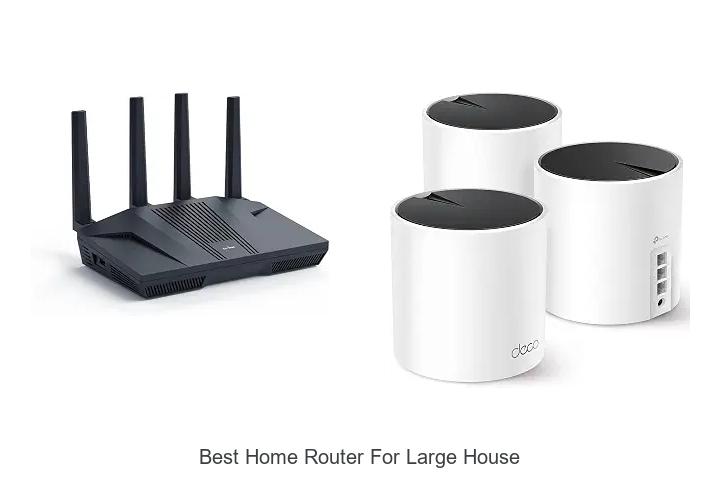
10 Best Home Router for Large House: Expert Picks & Guide
Slow Wi-Fi in a large house can make simple tasks frustrating. Video calls drop, streaming buffers, and rooms far from the modem often lose signal. A strong router can help solve these everyday issues.
This review looks at the best home router for large house setups. It is meant for families, remote workers, and anyone who needs steady coverage across many rooms.
The right model should give wider reach, stable speeds, and fewer dead zones. We will cover how each router performs in real homes. You will also see where each one fits best, from busy households to homes with thick walls.
You will also see where each one fits best, from busy households to homes with thick walls. By the end, you will know which router matches your space and your internet needs.
Best Home Routers for Large Houses Compared
| Image | Product | Price |
|---|---|---|
Pick 1  | GL.iNet GL-MT6000 Flint 2 Router | Check Price On Amazon |
Pick 2  | TP-Link Deco X55 Mesh System 3-Pack | Check Price On Amazon |
Pick 3  | NETGEAR Orbi 370 Series WiFi 7 Mesh System | Check Price On Amazon |
1. GL.iNet GL-MT6000 Flint 2 Router
Large homes need strong coverage and steady speeds across many rooms. The Flint 2 focuses on that job with Wi-Fi 6, dual 2.5G ports, and mesh support.
It aims to keep streaming, gaming, and video calls stable under heavy use. The router uses 8-stream Wi-Fi 6 technology and supports speeds up to 6 Gbps. That gives plenty of headroom for busy households with many connected devices.
It also supports AdGuard Home, guest mode, QoS, and access point mode. Those tools help with cleaner browsing, better traffic control, and flexible setup options.
The black body looks simple and practical, while the retractable antennas keep the design tidy. Setup is helped by the included user manual and Ethernet cable. GL.iNet also recommends updating firmware right away for better performance.
It suits large homes, mesh-style networks, and users who want strong wired and wireless options.
Pros
- Wi-Fi 6 performance suits busy households well.
- Dual 2.5G ports add fast wired flexibility.
- AdGuard Home support helps reduce unwanted ads.
Cons
- Firmware update is recommended during initial setup.
- Advanced features may feel complex for beginners.
- Dual-band design may limit extreme range needs.
Who Should Buy It?
Buy it for a large household that needs mesh-friendly coverage and fast wired connections. It fits homes with many devices, gaming consoles, and heavy streaming use. People who want VPN support, ad blocking, and traffic controls may like it most.
DIY users and more technical households will likely get the most value from its feature set.
Key Specifications
| Specification | Details |
|---|---|
| Model | GL-iNet GL-MT6000 Flint 2 Router |
| Wi-Fi Standard | Wi-Fi 6 |
| Band | Dual-Band |
| Coverage | Wide Coverage |
| Max Speed | 6000 megabits_per_second |
| Ports | 2 x 2.5G ports, 4 x 1G ports |
| Device Capacity | Over a hundred devices |
| Special Features | Access Point Mode, Guest Mode, Internet Security, QoS, AdGuard Home support |
| Recommended Uses | Business, Gaming, Home |
Wi-Fi 6 support gives the router modern wireless performance for crowded homes. The dual-band design helps separate traffic across two frequency bands. That can reduce congestion when many devices are active at once. Wide coverage suits larger spaces where a single router needs to reach more rooms. The 6,000 megabits-per-second rating shows it has plenty of wireless capacity for streaming, calls, and gaming. The unit also supports over a hundred devices, which matters in connected households.
The port layout adds two 2.5G ports and four 1G ports for wired devices. That helps consoles, desktops, and other gear get faster links where needed. Guest mode and access point mode make the router more flexible in mixed home setups. QoS can help manage traffic when multiple users share the network. AdGuard Home support adds control over DNS-based ad blocking. Together, these features suit users who want speed, management options, and room for expansion.
2. TP-Link Deco X55 Mesh System 3-Pack
A three-pack mesh system makes weak Wi-Fi feel far less frustrating. The Deco X55 aims to cover large homes with simple setup and broad device support.
TP-Link’s Deco X55 AX3000 WiFi 6 Mesh System uses three units to spread coverage across up to 6500 square feet. It supports Wi-Fi 6 speeds, with 2402 Mbps on 5 GHz and 574 Mbps on 2.4 GHz. Each unit includes three Gigabit Ethernet ports, and wired Ethernet backhaul can improve speeds between nodes.
The system can handle up to 150 devices, which suits busy homes with phones, tablets, TVs, gaming consoles, cameras, and printers. Setup happens through the Deco app, which gives clear visual guidance and remote control.
The units support guest mode, WPA3-Personal, and TP-Link HomeShield features like basic security, QoS, and parental controls. For the money, it offers strong coverage and useful flexibility for larger households.
Pros
- Strong coverage for large homes
- Supports up to 150 devices
- Three Ethernet ports per unit
Cons
- Performance varies with walls and distance
- No multi-gig Ethernet ports
- App-based setup may not suit everyone
Who Should Buy It?
Buy it for a large household that needs wide Wi-Fi coverage. It suits homes with many devices, multiple users, and dead zones. The three-pack layout works well for spreading signal across several floors or rooms.
It also fits buyers who want Wi-Fi 6, app control, and wired backhaul support without paying for premium extras they may not use.
Key Specifications
| Specification | Details |
|---|---|
| Model | Deco X55(3-Pack) |
| Wi-Fi Standard | Wi-Fi 6 |
| Band | Dual-Band |
| Coverage | 6500 square feet |
| Max Speed | 3000 megabits_per_second |
| Ports | 3 Gigabit Ethernet ports per unit |
| Device Capacity | up to 150 devices |
| Special Features | Guest Mode, AI-Driven Mesh, Wired Ethernet Backhaul, HomeShield, App Control |
| Recommended Uses | Home |
The Deco X55 uses Wi-Fi 6 and a dual-band design. That means it splits traffic between 2.4 GHz and 5 GHz bands. The listed speed reaches 3000 megabits per second, with most throughput coming from the 5 GHz band. In daily use, that helps support streaming, browsing, video calls, and gaming across a larger home. The three-pack layout spreads signal more evenly than a single router in hard-to-reach rooms.
Each unit has three Gigabit Ethernet ports, which helps wired devices stay connected. Wired Ethernet backhaul can link the mesh units for better speed consistency. The system also supports guest mode and app control, so setup and management stay simple. HomeShield adds basic network security, quality of service, and parental controls. Homes with many devices benefit most, since the system is designed for up to 150 connections across a 6500 square foot area.
3. NETGEAR Orbi 370 Series WiFi 7 Mesh System
Large homes need strong WiFi that reaches every room without extra hassle. The Orbi 370 Series aims to cover up to 6,000 square feet with one mesh system.
It uses a router plus two satellites to spread fast WiFi across multiple floors and outdoor areas. NETGEAR lists support for up to 70 devices on one network.
That makes it a strong fit for busy households with streaming, gaming, and video calls. WiFi 7 support brings speeds up to 5 Gbps for demanding homes. Dual-band technology with Enhanced Backhaul helps keep connections fast across the mesh.
It also works with WiFi 6 and WiFi 5 devices. Setup is guided through the Orbi app, which keeps installation simple. The system works with cable or fiber internet plans up to 2.5 Gbps.
Security features are enabled out of the box, with WPA3 and WPA2-PSK support. It suits families who want premium coverage and easy app-based control.
Pros
- Covers very large homes up to 6,000 square feet
- Supports up to 70 connected devices
- WiFi 7 speeds suit demanding streaming and gaming
Cons
- Dual-band design may limit flexibility for some users
- Three-pack setup may feel more than small homes need
- Requires compatible modem for internet service
Who Should Buy It?
Buy it if your home has dead zones, multiple floors, or a busy device load. It suits families that stream in 8K, game online, or hold many video calls. The mesh design also helps households that want app-based setup and simple network control.
It fits users who want premium coverage and modern WiFi 7 performance.
Key Specifications
| Specification | Details |
|---|---|
| Model | RBE373-100NAS |
| Wi-Fi Standard | 802.11.be |
| Band | Dual-Band |
| Coverage | 6,000 sq ft |
| Max Speed | 5 Gbps |
| Ports | 10 |
| Device Capacity | 70 devices |
| Special Features | Multi-Gig Ethernet, Enhanced Backhaul, app setup, security features |
| Recommended Uses | Business, Home |
The Orbi system uses WiFi 7, also listed as 802.11be. That means newer devices can access faster wireless performance. Its dual-band design sends traffic across two frequency bands. The mesh package includes one router and two satellites. Together, they cover up to 6,000 square feet. That range can reach front doors, basements, backyards, and rooftop spaces. Families with many rooms get more even coverage across the home.
Speed reaches up to 5 Gbps, with support for up to 70 devices. That helps households stream, game, and join calls at once. The system also includes 10 ports and Multi-Gig Ethernet support. That can help wired devices and faster internet plans. It works with cable or fiber service up to 2.5 Gbps. Setup uses the Orbi app, which suits users who want guided installation. Security features and WPA3 support add extra protection for daily use.
4. NETGEAR Nighthawk WiFi 7 Router RS500

A strong pick for homes that want WiFi 7 speeds and broad coverage. The RS500 aims to keep fast internet working across many devices at once.
NETGEAR’s Nighthawk RS500 is a tri-band WiFi 7 router built for large homes. It reaches up to 3,000 square feet and supports up to 120 devices.
The 6-antenna design helps spread signal across rooms, while MU-MIMO and OFDMA help keep traffic organized. It works with your existing modem or gateway through Ethernet, and setup runs through the Nighthawk app. You can manage WiFi, run speed tests, pause devices, and create guest networks from the app.
Performance is the main draw here. The RS500 supports up to 12 Gbps across 2.4 GHz, 5 GHz, and 6 GHz bands.
That makes it a smart fit for 4K or 8K streaming, video calls, gaming, and smart home gear. The build is straightforward, with fixed antennas and four ports, including one 2.5G port.
It offers WPA2-PSK and WPA3 security, plus advanced firewall protection. For large homes with fast internet plans, it brings a lot of speed and control in one router.
Pros
- WiFi 7 speeds up to 12 Gbps
- Covers up to 3,000 square feet
- Supports up to 120 connected devices
Cons
- Large homes may still need mesh coverage
- Only one 2.5G port is included
- Fixed antennas limit placement adjustments
Who Should Buy It?
Buy it if you want WiFi 7 performance in a large home. It suits households with fast internet plans, many connected devices, and heavy streaming or gaming use. Families using smart TVs, security cameras, phones, and computers will appreciate the tri-band design.
It also fits buyers who want app-based setup and network control without extra hardware.
Key Specifications
| Specification | Details |
|---|---|
| Model | RS500-100NAS |
| Wi-Fi Standard | 802.11be |
| Band | Tri-Band |
| Coverage | 3,000 sq ft |
| Max Speed | 12 Gbps |
| Ports | 4 ports, including 1 x 2.5G and 3 x Gigabit |
| Device Capacity | Up to 120 devices |
| Special Features | WiFi 7, tri-band, Nighthawk app control, advanced firewall security |
| Recommended Uses | Business, gaming, home |
The RS500 uses WiFi 7, also called 802.11be, across three bands. That setup helps spread traffic between 2.4 GHz, 5 GHz, and 6 GHz. In daily use, that means phones, TVs, cameras, and laptops can share the network more easily. The router is rated for up to 3,000 square feet, so it suits larger layouts. Its 120-device capacity also helps busy homes with many smart gadgets and active users at the same time.
Its 12 Gbps rating points to very high network headroom for fast plans. The 2.5G port helps connect one faster wired device, while three Gigabit ports handle other gear. WPA2-PSK and WPA3 add modern wireless security, and the advanced firewall adds another layer. The Nighthawk app makes setup and daily management easier for most users. People with large homes, gaming setups, or many connected devices will benefit most from these features.
5. TP-Link BE400 WiFi 7 Router

Big homes need strong wireless coverage, and the BE400 aims to deliver it affordably. It also brings Wi-Fi 7 features to newer phones, laptops, and streaming gear.
TP-Link positions the Archer BE400 as a dual-band Wi-Fi 7 router with six streams. It supports Multi-Link Operation, Multi-RUs, and 4K-QAM for faster, steadier connections. The rated speeds reach 5764 Mbps on 5 GHz and 688 Mbps on 2.4 GHz.
TP-Link says coverage reaches up to 2,400 square feet, with support for up to 90 devices. Six high-performance antennas and Beamforming help push signal farther through a busy house. Wired connections also get a boost from one 2.5 Gbps WAN or LAN port.
A second 2.5 Gbps LAN port and three 1 Gbps ports add flexibility. The router also supports EasyMesh, so you can expand coverage later.
Security features include WPA3, guest mode, parental control, QoS, and internet security. Setup and control are handled through app, remote, and voice controls. For families wanting Wi-Fi 7 without a premium price tier, it fits well.
Pros
- Wi-Fi 7 support at a budget-friendly level
- Strong wired options with two 2.5 Gbps ports
- EasyMesh support for future coverage expansion
Cons
- Dual-band only, not a tri-band design
- Coverage may still need mesh in very large homes
- Fixed antennas limit placement flexibility
Who Should Buy It?
Buy it if you want Wi-Fi 7 features without paying for a premium model. It suits medium to large homes that need stronger coverage and multi-device support. Families, gamers, and remote workers can all benefit from the 2.5 Gbps ports and EasyMesh support.
It also makes sense for homes planning future mesh expansion.
Key Specifications
| Specification | Details |
|---|---|
| Model | Archer BE400 |
| Wi-Fi Standard | 802.11be |
| Band | Dual-Band |
| Coverage | 2400 square feet |
| Max Speed | 6452 Mbps |
| Ports | 5 |
| Device Capacity | Up to 90 devices |
| Special Features | Access Point Mode, Guest Mode, Internet Security, Parental Control, QoS |
| Recommended Uses | Home |
The Archer BE400 uses Wi-Fi 7, which adds newer features for supported devices. Its dual-band design works across 5 GHz and 2.4 GHz bands. The rated coverage reaches 2,400 square feet, and device support goes up to 90 connections. That combination suits busy households with phones, laptops, streaming devices, and cameras. The 5 GHz band carries faster traffic, while 2.4 GHz helps farther rooms stay connected.
Two 2.5 Gbps ports give faster wired links for a modem or desktop. Three additional 1 Gbps ports add room for consoles or TVs. Six antennas and Beamforming help direct signal across the home. EasyMesh support also helps when one router is not enough. These specs favor families who want strong everyday performance and room to expand later. App, remote, and voice control also simplify setup and daily adjustments.
6. TP-Link Archer AX21 V5 Router

Budget-friendly Wi-Fi 6 support gives this router strong appeal for larger homes. Four high-gain antennas and beamforming help direct signal toward farther devices. The Archer AX21 V5 brings dual-band AX1800 performance for everyday streaming, gaming, and browsing.
It supports up to 1.8 Gbps total bandwidth across 5 GHz and 2.4 GHz. Wi-Fi 6 with OFDMA helps communicate with more devices at once. That matters in busy households with phones, tablets, consoles, and PCs online together.
The black chassis keeps a simple, practical look, while the fixed antennas favor straightforward setup. Five ports provide wired connection options for a modem and local devices.
Security includes WPA3, plus WPA/WPA2 support for older gear. It also supports Open VPN Server and PPTP VPN Server.
For the money, it suits shoppers wanting wide coverage without paying for premium extras.
Pros
- Affordable Wi-Fi 6 performance for large homes
- Four antennas and beamforming improve coverage
- Supports many devices with OFDMA
Cons
- Dual-band only, without 6 GHz support
- Fixed antennas limit placement flexibility
- Speed depends on your internet plan
Who Should Buy It?
Buyers with a large home and tight budget should consider it. It suits households that need better Wi-Fi coverage, many connected devices, and easy wired options. People streaming, gaming, or working from multiple rooms will appreciate the Wi-Fi 6 features and beamforming support.
It also fits users who want simple setup and broad ISP compatibility without paying for premium router extras.
Key Specifications
| Specification | Details |
|---|---|
| Model | Archer AX21 V5 |
| Wi-Fi Standard | Wi-Fi 6, 802.11ax |
| Band | Dual-Band |
| Coverage | Wide and reliable WiFi coverage |
| Max Speed | 1.8 Gbps total bandwidth |
| Ports | 5 |
| Device Capacity | Connects more devices simultaneously with OFDMA |
| Special Features | Beamforming, WPA3, VPN server support |
| Recommended Uses | Home |
Wi-Fi 6 support means the router can handle modern devices more efficiently. The dual-band design splits traffic between 5 GHz and 2.4 GHz. That helps phones, tablets, laptops, and consoles share the network better. The 1.8 Gbps total bandwidth gives enough headroom for streaming and gaming. Four high-gain antennas and beamforming help push signal toward rooms farther away. WPA3 adds current security support for everyday home use.
Five ports give room for a modem connection and several wired devices. OFDMA helps the router communicate with many devices at once, which suits busy households. The fixed antennas keep setup simple, though they do not adjust manually. VPN server support adds flexibility for users who need remote access. Because actual speeds depend on the internet plan, placement and obstacles still matter. Homes with many connected gadgets benefit most from these specs.
7. NETGEAR Nighthawk CAX30 Modem Router Combo

A cable modem and WiFi 6 router come together in one clean package. That makes the CAX30 appealing for homes that want fewer boxes and fewer setup steps.
NETGEAR built this model for households using cable internet plans. It supports DOCSIS 3.1, so gigabit-plus service can run across the network efficiently. The dual-band AX2700 WiFi 6 system covers up to 2,000 square feet and supports 25 plus devices.
Four Gigabit Ethernet ports help wired gear, like consoles and desktops, stay stable. The Nighthawk app adds guided setup, device pause controls, guest network options, and speed tests. Build quality looks practical and compact in black, with internal antennas and one USB 3.0 port.
It suits medium to large homes on compatible cable providers, especially where one device handling both modem and router makes life simpler.
Pros
- Modem and router in one device
- WiFi 6 supports many connected devices
- Four Gigabit ports for wired devices
Cons
- Works only with select cable providers
- Coverage may vary by home layout
- Not suitable for non-cable internet
Who Should Buy It?
Buyers with compatible cable internet plans should consider it. It fits homes that want modem and router functions in one unit. Families with many devices will like the WiFi 6 capacity and four wired ports.
It also suits users who want app-based setup and simple network controls without adding separate hardware.
Key Specifications
| Specification | Details |
|---|---|
| Model | CAX30-200NAS |
| Wi-Fi Standard | 802.11ax |
| Band | Dual-Band |
| Coverage | 2000 sq. ft. |
| Max Speed | 2700 Mbps |
| Ports | 4 |
| Device Capacity | 25+ connected devices |
| Special Features | 6 stream WiFi, One USB 3.0 port |
| Recommended Uses | Business, Gaming, Home |
The CAX30 combines a DOCSIS 3.1 cable modem with a WiFi 6 router. That means one device handles both internet access and home networking duties. Dual-band 802.11ax support helps spread traffic across two bands. The stated 2,000 square foot coverage fits many average homes, while 25 plus connected devices suits busy households. Four Gigabit Ethernet ports also give you room for wired gear, which helps desktops, consoles, and streamers stay connected reliably.
Its 2,700 Mbps data rate points to strong wireless capacity for daily use. In real homes, that helps when several people stream, game, and video call at once. Six-stream WiFi and OFDMA support can improve responsiveness during busy hours. The Nighthawk app makes setup and control easier for most users. Internal antennas and the compact design help keep installation simple. People with compatible cable plans gain the most from the one-box setup.
8. TP-Link AXE5400 Tri-Band WiFi 6E Router

Fast Wi-Fi matters most when many rooms need strong coverage. This TP-Link router targets that need with tri-band Wi-Fi 6E. It delivers up to 2,402 Mbps on 6 GHz, 5 GHz, and 574 Mbps on 2.4 GHz.
The 6 GHz band adds more bandwidth and lower latency for gaming and calls. OFDMA also raises capacity, so more devices can share the network at once.
The AXE5400 model uses a 1.0 GHz dual-core CPU and 512 MB memory. TP-Link says the housing supports better heat dissipation for long-term reliability. Eight antennas, beamforming, and high-speed wireless help extend coverage through a large home.
EasyMesh support can add another compatible router for one unified network. HomeShield, parental controls, QoS, and VPN support round out a feature set that suits busy homes and gaming-heavy setups.
Pros
- 6 GHz band helps cut lag for gaming
- Tri-band design supports more devices at once
- EasyMesh support expands whole-home coverage
Cons
- Not compatible with Deco mesh systems
- Requires compatible devices for 6E benefits
- Setup features may feel complex for beginners
Who Should Buy It?
Buy this router if you want strong wireless performance for gaming and streaming in a large home. It suits families with many connected devices, plus users who want 6E support for lower latency. It also fits buyers who may expand coverage later with EasyMesh-compatible hardware.
People who prefer app-based control, parental controls, and VPN support should find the feature mix useful.
Key Specifications
| Specification | Details |
|---|---|
| Model | TP-Link AXE5400 Tri-Band WiFi 6E Router (Archer AXE75) |
| Wi-Fi Standard | 802.11ax |
| Band | Tri-Band |
| Coverage | Whole-Home WiFi |
| Max Speed | 5400 megabits_per_second |
| Ports | 5 |
| Device Capacity | Connect More Devices with OFDMA technology |
| Special Features | WPS, Internet Security, LED Indicator, Alexa Compatible, Parental Control, QoS, Beamforming |
| Recommended Uses | Gaming |
The Archer AXE75 uses Wi-Fi 6E with tri-band support. That means 2.4 GHz, 5 GHz, and 6 GHz bands are all available. The listed speed reaches 5,400 megabits per second across the three bands. For daily use, that helps with 4K or 8K streaming, gaming, and busy households. Five ports also help when wired connections are needed for consoles, PCs, or other network gear.
OFDMA and beamforming help the router handle more devices across a home. The 6 GHz band gives more bandwidth and lower latency for responsive gaming. A 1.0 GHz dual-core CPU and 512 MB memory support steady operation. The router also includes parental controls, QoS, and Alexa compatibility. Those features help families manage traffic, prioritize devices, and keep setup control simple through the app.
9. TP-Link Archer BE600 WiFi 7 Router

Fast homes with many wired devices will appreciate this router immediately. Its tri-band Wi-Fi 7 design pairs with multi-gig ports for serious throughput. The Archer BE600 targets large households that want strong wireless coverage and fast Ethernet access.
It offers up to 2,600 square feet of coverage and support for 120 devices. Six antennas and beamforming help push signal toward harder rooms and farther corners.
The spec sheet stands out for future-ready networking. You get one 10 Gbps WAN or LAN port, one 2.5 Gbps WAN or LAN port, and three 2.5 Gbps LAN ports. Wi-Fi 7 features like Multi-Link Operation, Multi-RUs, 4K-QAM, and 320 MHz channels help support newer devices.
HomeShield adds security and parental controls, while access point mode gives setup flexibility. It suits multi-gig homes, gaming setups, and busy families needing high device capacity.
Pros
- Wi-Fi 7 support for newer devices
- Five multi-gig Ethernet ports included
- Covers up to 2,600 square feet
Cons
- Coverage may be limited for very large homes
- Advanced features may feel excessive for basic users
- Internal antennas may limit placement flexibility
Who Should Buy It?
Buyers with multi-gig internet and many connected devices should consider it. It fits large households, gaming setups, and homes with wired desktops, consoles, or smart TVs. People using newer Wi-Fi 7 phones or laptops may also benefit.
It suits users who want strong wireless performance, flexible Ethernet connections, and built-in security tools without moving to a mesh system yet.
Key Specifications
| Specification | Details |
|---|---|
| Model | Archer BE600 |
| Wi-Fi Standard | 802.11.be, 802.11ac, 802.11ax, 802.11g, 802.11n |
| Band | Tri-Band |
| Coverage | 2600 square feet |
| Max Speed | 9.7 gigabits per second |
| Ports | 1 x 10 Gbps WAN/LAN, 1 x 2.5 Gbps WAN/LAN, 3 x 2.5 Gbps LAN |
| Device Capacity | 120 devices |
| Special Features | Access Point Mode, Alexa Compatible, Parental Control, Private IoT Network, 320 MHz channel support in 6 GHz, HomeShield Security, Multi-Link Operation |
| Recommended Uses | Gaming, Home |
The Archer BE600 uses tri-band Wi-Fi 7 with support for newer and older standards. Its 320 MHz channels, Multi-Link Operation, and 4K-QAM help move data faster. The 2,600 square foot coverage rating fits many large homes. Support for 120 devices matters when phones, TVs, tablets, and consoles all stay online. Six antennas and beamforming help direct signal toward rooms that sit farther from the router.
Multi-gig ports make the router useful for wired devices and fast internet plans. The 10 Gbps port can handle very fast WAN or LAN links. Three 2.5 Gbps LAN ports support desktops, game consoles, and network storage. HomeShield security, parental controls, and a private IoT network add control for busy households. Access point mode also helps in mixed network setups. People with new devices and many wired connections benefit most.
10. GL.iNet Flint 3 Wi‑Fi 7 Router

Privacy-minded homes get a fast, flexible router here. The Flint 3 combines Wi-Fi 7 speed with VPN tools and ad blocking.
GL.iNet built the Flint 3 for busy households that need strong wireless coverage and network control. It supports tri-band Wi-Fi 7, 6 GHz connectivity, and MLO technology for lower latency in crowded homes. The router also offers rapid OpenVPN and WireGuard speeds up to 680 Mbps.
That helps protect traffic without crushing everyday performance. AdGuard Home support adds DNS-based ad blocking through a simple web interface.
The design includes five 2.5G ports, which suits wired PCs, consoles, and storage gear. GL.iNet says it can handle more than a hundred devices, making it a fit for large, active networks. Setup is straightforward through Ethernet and the admin panel.
The black, retractable-antenna build feels practical and space-efficient. It suits gamers, remote workers, and privacy-focused families that want control.
Pros
- Fast VPN support for secure browsing and streaming
- Tri-band Wi-Fi 7 with 6 GHz support
- Five 2.5G ports for wired devices
Cons
- Coverage tops out around 2,000 square feet
- Advanced features may feel complex for beginners
- VPN speed depends on your provider and server
Who Should Buy It?
Buy it for a large home that needs privacy tools and wired flexibility. It fits families, gamers, and remote workers who want VPN support, ad blocking, and room for many devices. People who use multiple smart devices or wired desktops should like the port selection.
It suits users comfortable with a web admin panel and advanced network controls.
Key Specifications
| Specification | Details |
|---|---|
| Model | GL-BE9300 Flint 3 |
| Wi-Fi Standard | 802.11be |
| Band | Tri-Band |
| Coverage | Up to 2000 square feet |
| Max Speed | 12.5 gigabits_per_second |
| Ports | 5 x 2.5G |
| Device Capacity | Over 100 devices |
| Special Features | WiFi 7, Remote Access, AdGuard Home support, MLO |
| Recommended Uses | Business, Gaming, Home |
| Price | Not provided |
The Flint 3 uses Wi-Fi 7 with tri-band support and a 6 GHz band. That combination helps split traffic across more lanes in busy homes. The router also includes five 2.5G ports for wired devices. Those ports help desktops, game consoles, and storage hardware get faster local connections. Coverage reaches up to 2,000 square feet, which suits many large houses. Support for over 100 devices also helps homes with many phones, TVs, and smart gadgets.
Its VPN support matters for everyday privacy and remote work. WireGuard and OpenVPN speeds reach up to 680 Mbps, so protected traffic can stay quick. AdGuard Home adds DNS filtering for unwanted ads and trackers. MLO, OFDMA, 4K QAM, and preamble puncturing help with latency and crowded networks. The Linux-based system and web admin panel may appeal to users who want control. People who value wired ports, VPN features, and device-heavy homes benefit most.
Best Home Router for a Large House: A Smart Buying Guide
Coverage and home size needs
Large homes often need more than a basic wireless setup because square footage, multiple floors, and thick walls can quickly weaken signal strength in far rooms. A router should have enough range and flexibility to handle the layout of the house, especially if bedrooms, offices, or entertainment areas sit on different levels or behind concrete, brick, or metal surfaces that block signals.
Placement also matters, since a central location can help reduce dead zones and deliver steadier speeds throughout the home. To make a smart decision, it helps to compare how well different models support extra access points, mesh add-ons, or wired backhaul options, since these features can make it easier to expand coverage later if the signal does not reach every corner of the house.
Wifi performance specs
WiFi standards determine how efficiently a router can handle modern devices, and newer generations such as Wi‑Fi 6 or Wi‑Fi 7 usually deliver better range, stronger capacity, and more stable performance across a large house. Band count and channel options matter just as much, because a dual-band or tri-band model can spread traffic across multiple lanes, reduce congestion, and keep streaming, gaming, and video calls smoother in rooms far from the main unit.
Speed ratings and real-world throughput should also be weighed carefully, since a high advertised number does not always translate into everyday performance once walls, distance, and multiple connected devices are involved.
- WiFi standards: Newer generations support more devices and better efficiency.
- Band count and channels: Extra bands help distribute traffic and reduce slowdown in busy homes.
- Speed and throughput: Actual home performance matters more than the headline maximum.
Mesh vs single router
Large homes often need more than a single wireless unit to deliver steady coverage from room to room. A mesh system is the better fit for multi-story layouts, thick walls, or spaces with dead zones because it spreads the signal through multiple nodes and keeps devices connected as you move around the house. Those extra nodes improve reach, reduce dropouts, and help maintain strong speeds in bedrooms, basements, and outdoor areas.
A single router can still be enough for smaller homes, open floor plans, or spaces where the main unit sits near the center and can cover every area without strain. In practice, the right setup depends on how much area must be covered, how many devices stay online at once, and whether future add-ons may be needed to extend coverage later.
Device capacity and smart home use
A modern household can easily have dozens of phones, laptops, TVs, consoles, cameras, and voice assistants online at the same time, so the network must handle heavy traffic without slowing down. A strong router should support enough devices to keep streaming smooth, gaming responsive, and video calls stable even during busy hours.
- Number of connected devices: More devices mean more strain on the network, especially in larger homes with multiple users.
- Bandwidth demands for streaming and gaming: High-definition video and online games need fast, stable speeds with low lag.
- Support for smart home accessories: A well-equipped router keeps connected gadgets responsive and easy to manage.
Ports and wired connectivity
Ports and wired access matter because a large home often needs more than a strong Wi‑Fi signal. A router with enough Ethernet ports makes it easier to connect desktop PCs, smart TVs, gaming consoles, and mesh nodes without relying on wireless links, while faster port speeds help prevent bottlenecks during large file transfers, online gaming, and 4K streaming. Multigig support is especially valuable if your internet plan is faster than 1 Gbps or if you move data between devices on the local network at high speed, since it lets wired equipment take full advantage of that bandwidth.
A router with the right mix of wired options and room for future upgrades is better prepared to serve a busy household over time.
Security and setup features
Built-in security tools and parental controls are essential because a large household usually means more phones, tablets, laptops, and smart devices sharing the same network. A router with strong protection can help block threats, filter unsafe content, and give you more control over internet access for children and guests.
Firmware updates and long-term support also matter because they keep the system secure, improve performance, and extend the router’s useful life as your internet needs grow. Together, these features help create a safer, easier-to-manage network that can stay reliable over time.
Safe and Smart Router Use Tips
A good router can cover a large house, but safety and smart setup still matter. Place it in a central spot, away from floors, thick walls, and other electronics that can block the signal. A raised shelf often works better than a corner on the ground.
Keep the router in a dry, open area. Do not cover it with books, fabric, or boxes. These can trap heat and make the device work harder. Leave a little space around the vents so air can move freely.
Strong passwords help protect your network. Use a unique Wi‑Fi password and a separate admin password for the router settings. Change the default login details right after setup if the brand allows it.
It also helps to turn on automatic firmware updates. These updates can fix bugs and security gaps. If automatic updates are not available, check for new firmware from time to time through the router app or web page.
For a busy home, set up guest Wi‑Fi for visitors and smart devices when possible. This keeps shared access separate from your main devices, like laptops and phones.
- Place the router high and central.
- Keep it cool and uncovered.
- Use strong, unique passwords.
- Update firmware when available.
- Separate guests from your main network.
With these simple habits, a home router can work better and stay safer in a large house.
FAQ’s
What Features Should I Look For In The Best Home Router For A Large House?
Look for a router with strong coverage, preferably Wi‑Fi 6 or 6E, multiple antennas, and mesh support or the ability to add extenders for dead zones. Also prioritize high speed, dual- or tri-band support, enough Ethernet ports, and good security and parental control features.
Is A Mesh Wi-Fi System Better Than A Traditional Router For Large Homes?
Yes, a mesh Wi‑Fi system is usually better for large homes because it uses multiple units to spread strong, consistent coverage throughout the space. A traditional router can work well in smaller areas, but it may leave dead zones in bigger homes.
How Many Routers Or Access Points Do I Need To Cover A Large House?
For a large house, you’ll usually need **1 router plus 1–3 access points or mesh nodes**, depending on the home’s size, layout, and wall materials. A Wi‑Fi coverage map or speed test can help determine the exact number you need.
Which Wi-Fi Standards Offer The Best Performance For Large Homes?
For large homes, **Wi‑Fi 6, Wi‑Fi 6E, and Wi‑Fi 7** offer the best performance because they provide faster speeds, better efficiency, and improved handling of many devices. If you need the strongest coverage, a **mesh Wi‑Fi system** with one of these standards is usually the best choice.
How Do I Choose A Router That Provides Strong Coverage Through Walls And Multiple Floors?
Choose a router with Wi‑Fi 6 or Wi‑Fi 6E, strong antennas, and support for mesh networking or additional access points to better handle walls and multiple floors. Also check the router’s coverage rating, place it centrally and elevated, and favor models with band steering and beamforming for stronger, more consistent signal.
Final Verdict
For most households, the GL.iNet GL-MT6000 Flint 2 is the strongest all-around choice in this best home router for large house roundup, especially if you want a router that can anchor a large-home mesh setup with strong flexibility. It suits buyers who want broad coverage, solid feature depth, and a setup that can grow with the home.
The TP-Link Deco X55 3-pack is the best value pick for families that want whole-home coverage without paying premium prices. For buyers who want the fastest wireless standards and the broadest coverage tier, the NETGEAR Orbi 370 Series WiFi 7 Mesh System is the premium option. The GL.iNet Flint 3 Wi‑Fi 7 Router is the best fit for gamers and privacy-focused users who want strong VPN support and low-latency performance.
Choose the GL.iNet Flint 2 for the best balance of coverage, features, and flexibility, or step up to the Deco X55, Orbi 370, or Flint 3 based on your budget, Wi‑Fi 7 needs, and gaming or privacy priorities.


