10 Best Cashless Payment Device for EV Charging Stations: Top Picks Compared
Finding a simple way to collect EV charging payments can be hard. Drivers want fast checkout, and station owners need a system that works without delays or extra steps.
That is why many operators are searching for the best cashless payment device for ev charging stations. It can help cut waiting time, support more payment methods, and make daily use easier for both staff and customers. This kind of device is made for charging sites that need a smooth payment setup.
It also fits owners who want to reduce cash handling and keep the payment process clear at the charger. In this review, we will look at what the product offers, who it suits best, and how it performs in real use. You will also see the main strengths and limits before deciding if it fits your station.
Top Cashless Payment Devices for EV Charging Stations
| Image | Product | Price |
|---|---|---|
Pick 1  | VPOS Touch | Check Price On Amazon |
Pick 2  | Square Reader for Contactless and Chip (2nd Generation) | Check Price On Amazon |
Pick 3  | Square Terminal Credit Card Machine | Check Price On Amazon |
1. VPOS Touch
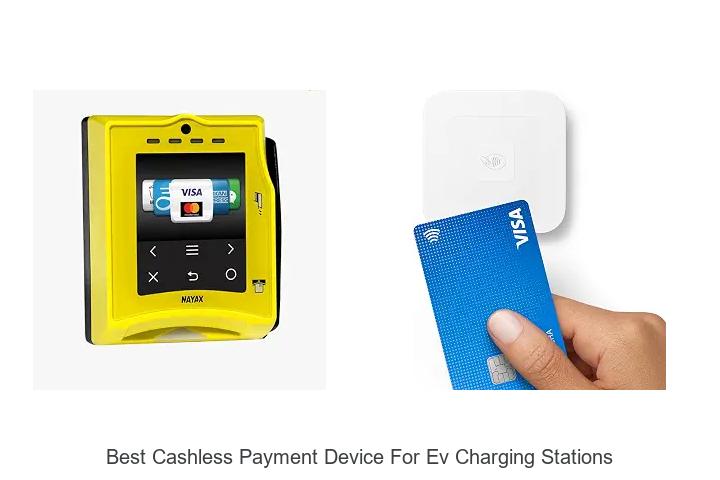
Unattended payment becomes far simpler with VPOS Touch. It combines card acceptance, cellular connectivity, and remote monitoring in one compact unit. VPOS Touch supports EMV chip cards, NFC contactless wallets, and magnetic stripe payments.
The included 4G LTE antenna and MDB harness help it connect quickly without separate Wi-Fi or ethernet setup. That makes it a practical fit for machines that need reliable self-service payments. The Nayax management suite adds real-time sales data, inventory visibility, and mobile alerts.
Its PCI DSS compliance and EMV certifications add confidence for operators and customers. The plastic housing is compact at 3.5 by 2 by 4 inches. It suits vending machines, car washes, laundromats, kiosks, and amusement games.
For unattended charging stations, it offers straightforward integration and broad payment flexibility.
Pros
- Accepts chip, contactless, and magnetic stripe payments.
- Built-in 4G LTE simplifies installation.
- Remote telemetry supports unattended operation.
Cons
- Designed for many machines, not charging-focused hardware.
- Plastic construction may feel less premium.
- No screen size information is provided.
Who Should Buy It?
Operators who need unattended cashless payments should consider VPOS Touch. It suits locations that benefit from remote monitoring and quick cellular setup. Businesses using MDB or Pulse protocols may find integration easier.
It also fits shared machines that need chip, contactless, and swipe acceptance. EV charging sites with self-service payment needs can benefit from its compact design.
Key Specifications
| Specification | Details |
|---|---|
| Payment Types | EMV chip cards, NFC contactless, Magnetic Stripe |
| Connectivity | 4G LTE antenna, MDB communication harness |
| Power Source | Battery |
| Compatibility | Vending machines, car washes, laundromats, kiosks, amusement games; MDB or Pulse protocols |
| Mounting/Integration | Plug-and-play; includes MDB cable and QR code decal |
| Telemetry | Real-time telemetry, remote inventory, sales data, cash level monitoring, mobile alerts |
| Durability | Plastic body; PCI DSS compliant; EMV Level 1 and 2 certified |
VPOS Touch accepts EMV chip cards, NFC wallets, and magnetic stripe payments. That mix helps drivers pay with common cards or phones quickly. Its 4G LTE antenna and MDB harness support cellular setup without local network wiring. The unit runs on battery power, and no batteries are required. In everyday use, that means fewer network steps during installation. Operators can place it where wired internet is unavailable and still process payments reliably.
The device works with MDB or Pulse systems across several machine types. That flexibility helps operators reuse existing equipment without major changes. Plug-and-play installation, an included MDB cable, and remote telemetry reduce setup effort. Real-time sales, inventory, and cash-level data help owners manage machines from afar. Its compact plastic body keeps the unit small, while PCI DSS and EMV certifications support secure payment handling. These features suit unattended sites needing quick deployment and remote oversight.
2. Square Reader for Contactless and Chip (2nd Generation)
Tap-and-pay simplicity makes Square Reader appealing for busy charging sites. It accepts contactless payments, chip cards, Apple Pay, and Google Pay.
Square Reader for contactless and chip offers a low-friction setup for operators who want quick card acceptance without complicated hardware. It pairs with Android and iPhone devices through Bluetooth, and it stays connected with improved connectivity.
The battery-powered design supports portable use, while offline payments can keep transactions moving for up to 24 hours. That flexibility helps when charging stations need payment access across different locations.
Security features, fraud prevention, and payment-dispute management come included. The reader suits operators wanting a familiar Square POS experience with simple tap-or-dip payment handling.
Pros
- Accepts tap, chip, Apple Pay, and Google Pay
- Works with Android and iPhone over Bluetooth
- Offline payments support continued use for 24 hours
Cons
- Needs a separate compatible phone or tablet
- No built-in screen for on-device checkout
- Not designed for fixed station integration details
Who Should Buy It?
Buy it if you need a simple contactless reader for charging sites. It suits smaller operators, temporary locations, and mobile setups that want tap, chip, and wallet payments without monthly fees. Businesses already using Square can move fast with familiar POS tools and Bluetooth pairing.
Teams that value portable payment acceptance and offline processing will get the most from it.
Key Specifications
| Specification | Details |
|---|---|
| Payment Types | Contactless payments, chip cards, Apple Pay, Google Pay |
| Connectivity | Bluetooth |
| Battery Life | Up to 24 hours of offline payments |
| Offline Payments | Supported for up to 24 hours |
| Screen Size | No built-in screen |
| Power Source | Battery powered |
| Compatibility | Android, iPhone |
| Mounting/Integration | Portable reader, stays paired to your device |
| Telemetry | Data security, fraud prevention, payment-dispute management |
| Durability | Enhanced security, improved connectivity, limited 1-year warranty |
The Square Reader accepts contactless payments, chip cards, Apple Pay, and Google Pay. It connects through Bluetooth to Android and iPhone devices, so the checkout point stays tied to a phone or tablet. Battery power keeps the unit portable, and offline payments can continue for up to 24 hours. That combination works well for charging stations that need quick tap-or-dip transactions without fixed terminal hardware or extra wiring at each location.
Improved connectivity helps the reader stay paired to the host device during payment use. The lack of a built-in screen keeps the unit simple and compact, while security tools handle fraud prevention and payment disputes. For operators, that means less on-device complexity and a setup that depends on a separate mobile device for checkout control. It suits small fleets, temporary kiosks, and distributed charging points that value portability over integrated display hardware.
3. Square Terminal Credit Card Machine
Square Terminal brings checkout, payments, and receipts together in one compact unit. It suits busy counters and mobile service points needing quick card acceptance.
The device accepts all major credit and debit cards, with one low rate and no hidden fees. It also processes chip cards in just two seconds.
That speed helps reduce waits during busy charging sessions or retail stopovers. The built-in battery supports cord-free use all day, which adds placement flexibility. You can ring up sales at the counter or move around your space.
It prints receipts directly, so no separate printer setup is needed.
Its small footprint and light weight make it easy to place and carry. The all-in-one design simplifies setup for operators wanting fewer devices. Money arrives as soon as the next business day, which helps cash flow.
It suits operators who value fast payment acceptance and simple daily use. Businesses that want card payments, receipt printing, and portable checkout in one unit will appreciate it most.
Pros
- Accepts major cards with one low rate
- Built-in battery supports all-day cordless use
- Prints receipts from the same device
Cons
- No offline payment details are provided
- No telemetry features are listed
- Screen size is not specified
Who Should Buy It?
Operators who want one device for payments, receipts, and checkout should consider it. It fits counters and mobile service points where quick card acceptance matters. Businesses that value simple setup, cordless use, and fast chip-card processing may like it most.
It also suits locations that need a compact unit and next-business-day money access.
Key Specifications
| Specification | Details |
|---|---|
| Payment Types | All major credit and debit cards |
| Battery Life | All day |
| Power Source | Built-in lithium-ion battery |
| Compatibility | Mobile POS use; counter or anywhere in your store |
| Mounting/Integration | Standalone all-in-one checkout device |
The listed payment support covers major credit and debit cards. That means customers can pay using common card types at the counter or elsewhere. The built-in battery matters for daily use because it allows cordless operation. Since the device also prints receipts, staff can complete checkout without extra hardware. For a business handling quick transactions, those basics reduce setup steps and keep payment handling contained in one unit.
All-day battery life helps the terminal stay usable through busy shifts. Its small size and light weight also make placement easier in tight spaces. Since it works as a mobile POS, staff can move it around a store or service area. The standalone design benefits operators who want fewer components to manage. Faster chip-card processing can also shorten waits, which helps during repeated customer stops.
4. Square Handheld Portable POS Credit Card Machine

Mobile payment handling feels easy with a device built for quick movement. Square Handheld fits in a palm or pocket and supports payments anywhere.
Square Handheld suits busy counters, tableside ordering, and barcode scanning in one unit. Its slim shape and comfortable grip help during long shifts and frequent carry.
The device accepts major credit and debit cards with one simple rate. Water splashes and dust resistance add practical protection for active environments.
An optional protective case helps guard against accidental drops during daily use. The battery can power through a full shift for steady selling. Offline payments help keep transactions moving when internet service drops.
Its lightweight design makes setup simple and reduces hand fatigue. For mobile teams, it offers a compact way to take payments and orders.
Pros
- Pocketable design supports fast movement and easy carry.
- Built-in barcode scanner adds useful checkout flexibility.
- Offline payments help when internet service drops.
Cons
- Optional protective case is needed for extra drop protection.
- Not designed for fixed countertop use.
- Screen size details are not provided.
Who Should Buy It?
People who need portable field payment handling should consider it. It suits staff moving between locations, taking orders tableside, or scanning barcodes on the go. Small retail teams, beauty professionals, and mobile service operators may also appreciate its light weight and pocketable design.
It works well for users who value simple card acceptance and offline payment support.
Key Specifications
| Specification | Details |
|---|---|
| Payment Types | Major credit and debit cards |
| Battery Life | Long-lasting battery |
| Offline Payments | Supported |
| Durability | Water splash and dust resistant |
| Compatibility | Restaurants, retail, beauty, and professional services |
Square Handheld accepts major credit and debit cards for everyday transactions. A long-lasting battery supports selling during long shifts without frequent charging. Offline payments help staff keep taking money even when internet service drops. In daily use, that means fewer interruptions at busy counters or while moving around. The device’s pocketable shape also suits workers who carry payment tools between customers, tables, or service areas.
Water splash and dust resistance help the device handle busy work settings. The slim body and comfortable grip make it easy to hold for longer periods. Its lightweight build reduces hand strain during repeated use across a shift. An optional protective case adds another layer against accidental drops. Teams that need mobile checkout, tableside ordering, or barcode scanning will benefit most from that mix of portability and practical protection.
5. Clover GO Mobile POS System

Pocket-sized payment hardware can simplify charging station checkout. Clover GO focuses on wireless card acceptance through a phone connection. It pairs with a mobile device by Bluetooth, keeping setup compact and portable.
The system supports tips, custom tax rates, and paperless receipts by email or text. That makes it useful for busy curbside or station-side payment workflows.
Security is built into the transaction flow from card acceptance onward. Clover GO also supports employee permissions, which helps owners limit access by role. The device is small and lightweight, at 5.6 ounces.
It suits businesses that want a mobile POS without bulky hardware. Because it requires processing through Powering POS, it fits operators already using that service. For EV charging stations, it works well where staff need portable payment handling and fast receipt delivery.
It is a practical pick for budget-minded operators who want simple mobile payments.
Pros
- Bluetooth pairing keeps setup compact and portable
- Supports tips, taxes, and paperless receipts
- Employee permissions help control access
Cons
- Requires processing through Powering POS
- US based businesses only
- No built-in screen listed
Who Should Buy It?
Who should buy it: Operators who want a compact mobile POS for payment collection at EV charging stations. It suits budget-focused businesses that need wireless card acceptance, receipt delivery by text or email, and basic staff permission controls. It also fits teams already using Powering POS and working within U.S. business requirements.
Mobile attendants and small station operators may value its simple, pocket-sized format.
Key Specifications
| Specification | Details |
|---|---|
| Payment Types | Card payments |
| Connectivity | Bluetooth |
| Battery Life | Not listed |
| Offline Payments | Not listed |
| Screen Size | Not listed |
| Power Source | Mobile device connection |
| Compatibility | Any smartphone |
| Mounting/Integration | Mobile POS, requires Powering POS processing |
| Telemetry | Not listed |
| Durability | Not listed |
| Price | Not listed |
Clover GO connects through Bluetooth and works with any smartphone. That means the payment device stays small while your phone handles the main interface. Card acceptance, tips, taxes, and receipt delivery happen through the mobile setup. For an EV charging station, that kind of portability helps staff move between vehicles or kiosks without carrying larger terminals. The lack of a listed screen suggests a phone-led experience, which keeps hardware light and simple for daily use.
The small 5.6-ounce body should be easy to carry during shifts. Security coverage starts when a card is accepted and continues through the transaction. Employee permissions also help separate duties among staff members. Since it requires Powering POS processing, setup fits businesses already aligned with that system. US-only availability narrows its audience, but the format suits operators who want compact payment handling, quick receipt options, and basic control over access without extra bulk.
6. Sintron ST-004-F Payment Timer Power Box

Timed power control gives this unit a practical role in shared charging setups. It combines coin acceptance with mobile payment, so users have two payment paths. The Sintron ST-004-F is designed for North American devices and supports up to 16A.
That makes it useful for appliances like washers, and potentially other timed loads. The LCD lets operators show custom text, such as a store name or contact number. Customers can scan a QR code and pay in a browser without installing an app.
The coin acceptor supports up to eight coin types through the ST-001 module. OTA firmware updates add flexibility for future changes. A 3-prong 110V Wi-Fi style points to easy networked operation.
The unit suits businesses that want timed access, clear user guidance, and mixed payment convenience.
Pros
- Supports coins and mobile payment in one unit.
- Custom LCD text helps users identify the station.
- OTA updates support future firmware changes.
Cons
- Limited to 16A applications.
- Coin acceptance depends on the separate ST-001 acceptor.
- Screen size is small for detailed instructions.
Who Should Buy It?
Buyers managing timed charging or timed utility access should consider it. It suits business sites that want coin payments and browser-based mobile payments together. The custom LCD helps with user instructions and contact details.
It also fits setups that need Wi-Fi connectivity and OTA firmware updates. Operators who want straightforward payment control for shared equipment may find it appealing.
Key Specifications
| Specification | Details |
|---|---|
| Payment Types | Coins and mobile payment |
| Connectivity | Wi-Fi |
| Screen Size | 2.4 inches |
| Power Source | 3 prong 110V |
| Compatibility | US and Canada electronic devices, up to 16A |
| Mounting/Integration | Coin acceptor via Sintron ST-001 module |
| Telemetry | LCD display with customizable text |
The ST-004-F combines coin acceptance with browser-based mobile payment. That means users can pay at the machine or with a phone camera. The 2.4-inch LCD gives a small but useful display area for instructions. Custom text can show a store name or contact number. For shared charging or timed power access, that helps people understand what to do quickly. The Wi-Fi connection supports networked use without extra app installation on the customer side.
Its 3-prong 110V design targets US and Canada equipment. The unit supports up to 16A, which fits many timed appliances and charging-related loads. Coin handling relies on the Sintron ST-001 acceptor, which reads up to eight coin types. OTA updates can keep firmware current without manual replacement. Operators who need simple payment control, basic display messaging, and mixed payment options will benefit most from that setup. The compact LCD also suits installations where space is limited.
7. ChargePoint HomeFlex EV Charger
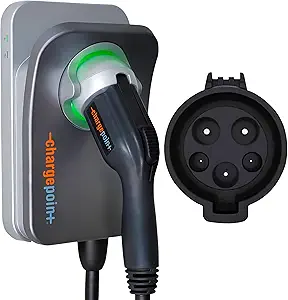
Home charging feels easier when the charger stays smart, reliable, and simple to live with. ChargePoint HomeFlex fits that role with app control, flexible installation, and a durable build.
Built for home use, the HomeFlex is a hardwired Level 2 charger with a J1772 connector for non-Tesla EVs. It delivers up to 45 miles of range per hour, depending on the vehicle. The charger works indoors or outdoors and carries UL certification and Energy Star status.
Its 23-foot cable gives generous reach, while adjustable 16-50A settings help match different electrical setups. The ChargePoint mobile app adds charging data, reminders, station search, and smart home connections.
WiFi is needed for some features and troubleshooting. The unit suits drivers who want dependable home charging with app-based control and a clean installation.
Pros
- App control adds charging data and reminders
- Indoor or outdoor installation flexibility
- Fast Level 2 charging for home use
Cons
- Requires hardwired installation by an electrician
- WiFi needed for some app functions
- Tesla drivers need an adapter
Who Should Buy It?
Home EV owners who want a smart, hardwired charger should consider it. It suits drivers who value app controls, charging reminders, and outdoor-rated hardware. Non-Tesla owners get direct J1772 compatibility, while Tesla drivers can use an adapter.
It also fits households that want a flexible, installed solution for daily charging without relying on public stations.
Key Specifications
| Specification | Details |
|---|---|
| Connectivity | WiFi, ChargePoint Mobile App |
| Power Source | 240 volts AC |
| Compatibility | J1772, non-Tesla EVs |
| Mounting/Integration | Hardwired, indoor/outdoor installation |
| Durability | UL-certified, Energy Star, cold-resistant cable |
WiFi and the ChargePoint Mobile App shape how people use the charger day to day. The app handles charging data, reminders, station searches, and smart home connections. That means drivers can check charging activity without standing beside the unit. WiFi also supports certain features and troubleshooting. For home users, this makes the charger feel more connected and easier to manage, especially when charging becomes part of a regular routine.
The 240-volt power setup and hardwired design suit permanent home charging. Adjustable 16-50A settings let electricians match the charger to the circuit. The J1772 connector works with non-Tesla EVs, while Tesla owners need an adapter. UL certification, Energy Star status, and a cold-resistant cable point to a charger built for lasting use. Indoor or outdoor installation gives households more placement options, and the 23-foot cable helps reach parking spots more easily.
8. BLACKBOX EV Charger 240V 60-100A

Home charging can get expensive when an electrical panel needs an upgrade. BLACKBOX answers that problem with load-managed charging for 60A to 100A service. It supports 240-volt EV charging and works with many charger brands.
The system allows charge rates from 16 Amp through 48 Amp, covering 3.8 kW to 11.5 kW. That range gives drivers flexibility for different vehicles and charging habits.
Its compact 8 x 6 x 4 inch size helps near-panel installation. The patented algorithm extends on-times when power is available. It pauses charging when household capacity drops.
That helps protect the charger from repeated power cycling. Installation by a qualified electrician is recommended.
It suits homes wanting managed charging without panel service upgrades.
Pros
- Supports many charge rates up to 48 Amp.
- Works with any brand of EV charger.
- Avoids costly electrical panel service upgrades.
Cons
- EV charger is sold separately.
- Requires qualified electrician installation.
- No built-in payment hardware or screen.
Who Should Buy It?
Buy it if you need controlled EV charging on limited electrical service. It fits homes or properties with 60A to 100A service that cannot easily support a panel upgrade. It also suits owners who already have a compatible charger and want smarter load management.
This is a practical choice for people prioritizing charging access over integrated payment features.
Key Specifications
| Specification | Details |
|---|---|
| Power Source | 240 volts |
| Compatibility | Works with any brand of EV charger; compatible with Autel, Grizzl-e, Tesla, Aimiler, Awesafe, Charge Point, and Vevor |
| Mounting/Integration | Compact 8 x 6 x 4 inch unit for installation near an electrical panel |
| Telemetry | Intelligent energy management with patented algorithm and automatic charging control |
| Durability | ETL and NEC specification met; protects against premature charger failure from power cycling |
The BLACKBOX runs on 240 volts and manages charging through intelligent energy control. It supports 60A to 100A service sizes, which makes it useful in homes with tighter electrical limits. The device can allow 16 Amp, 20/24 Amp, 30/32 Amp, 40 Amp, or 48 Amp charging. That range helps match different EV charging needs while keeping household power use within available capacity. It is designed for use with a separate charger.
Its compact 8 x 6 x 4 inch body helps simplify placement near a panel. Compatibility with many charger brands makes setup flexible for different garages and fleet spaces. Automatic halting during capacity shortages can help avoid unnecessary stress on the charging equipment. The ETL and NEC specifications support confidence in installation standards. Drivers who want overnight charging and property owners who want managed load control will get the most practical value from it.
9. EV Range Commercial EV Charging Station

Commercial charging gets a revenue model built right in. Drivers pay through the EV Range app, while owners manage access and pricing.
EV Range Commercial EV Charging Station suits hotels, retail sites, workplaces, and fleets. It supports custom pricing and idle fees, with monthly payouts and usage reports included.
OCPP compliance gives it broad network compatibility, while RFID and app access help control who can charge. The station uses a J1772 connector with a 25-foot cable, making it compatible with plug-in hybrids and most electric vehicles.
Tesla drivers can use adapters supplied with their vehicles. Its polycarbonate NEMA 4 enclosure carries IK10 impact resistance, so it fits marine, desert, and snowy environments.
Wall mounting is supported, and pedestal mounting is possible with separate hardware. The charger runs on 240 volts at 32 amps, and it carries Energy Star and UL specifications.
That mix makes it practical for commercial sites that want charging and payment handling in one package. It suits operators who want billing control without extra software complexity.
Pros
- Supports app payments and RFID access control
- Custom pricing, idle fees, and monthly payouts
- Weather-ready enclosure with impact resistance
Cons
- Pedestal hardware is not included
- Single port limits charging capacity
- Tesla drivers need a separate adapter
Who Should Buy It?
Buy it if you manage a commercial charging location with public or fleet traffic. It fits hotels, apartments, workplaces, retail sites, and similar properties. Operators who want app-based payments, RFID access, and usage reports will benefit most.
It also suits sites that need weather resistance and controlled access in one charger.
Key Specifications
| Specification | Details |
|---|---|
| Payment Types | Credit card through EV Range app |
| Connectivity | OCPP-compliant, network ready |
| Power Source | 240 volts AC |
| Compatibility | All plug-in hybrids and electric vehicles with Tesla adapters |
| Mounting/Integration | Wall or pedestal mountable; pedestal not included |
| Telemetry | Monthly payouts and usage reports included |
| Durability | Polycarbonate NEMA 4 enclosure, IK10 impact resistance |
| Price | Not provided |
The payment setup centers on the EV Range app, where drivers pay by credit card. Site owners can also use RFID access control for private or fleet use. Monthly payouts and usage reports help track charging activity without manual handling. That makes the station practical for businesses that want billing, access control, and record keeping in one system. It works well for properties with mixed public and restricted use.
The charger runs on 240 volts and 32 amps, with a J1772 connector and 25-foot cable. That cable length helps with parking layouts at commercial sites. The NEMA 4 polycarbonate enclosure and IK10 impact resistance support outdoor use in harsh weather. Wall mounting is standard, while pedestal mounting needs separate hardware. Sites with hotels, apartments, workplaces, and retail parking lots benefit most from that flexibility.
10. Nayax VPOS Touch Cashless Payment Reader

Universal payment support gives the Nayax VPOS Touch wide appeal. Its touchscreen interface also makes everyday use straightforward for unattended setups.
The Nayax VPOS Touch Cashless Payment Reader accepts credit and debit cards, NFC, mobile wallets, and QR codes. It supports swipe, contact, and contactless transactions, which helps serve many payment preferences. The 2.4-inch color LCD includes multi-language support and voice prompts, making interaction clearer for different users.
Real-time telemetry helps operators monitor sales, inventory, and performance remotely. Marketing tools such as loyalty programs, discounts, and punch cards add extra flexibility.
Dragontrail glass, shock detection, and an IP55 rating support tough unattended use. Plug-and-play installation and remote software updates make setup and maintenance easier. Its compact size suits space-conscious installations, while its universal compatibility makes it a strong fit for mixed-payment environments.
For operators needing broad payment acceptance, it offers strong everyday practicality.
Pros
- Supports cards, NFC, mobile wallets, and QR codes
- Includes remote monitoring and software updates
- Durable build with Dragontrail glass and IP55 rating
Cons
- Screen is small for users wanting larger displays
- Battery life is not listed
- Offline payment support is not specified
Who Should Buy It?
Operators who need broad payment acceptance should consider it. It suits unattended machines that benefit from card, NFC, wallet, and QR support. The remote telemetry, marketing tools, and update options help manage many locations with less on-site work.
Its durable housing also fits settings where tampering and wear are concerns.
Key Specifications
| Specification | Details |
|---|---|
| Payment Types | Credit/debit cards, NFC, mobile wallets, QR codes |
| Connectivity | Pulse compatible; MDB and remote telemetry support |
| Battery Life | Not listed |
| Offline Payments | Not listed |
| Screen Size | 2.4-inch color LCD |
| Power Source | Not listed |
| Compatibility | MDB and Pulse compatible |
| Mounting/Integration | Plug and play installation |
| Telemetry | Real-time sales, inventory, and performance monitoring |
| Durability | Dragontrail glass, shock detection, IP55 rated |
| Price | Not listed |
The payment support covers cards, mobile wallets, NFC, and QR codes. In daily use, that means fewer payment hurdles for riders at charging stops. The 2.4-inch color LCD adds simple guidance, while voice prompts help users confirm actions quickly. Multi-language support also helps when stations serve diverse customers. Together, these features make payment handling feel familiar, even in unattended environments where speed matters.
MDB and Pulse compatibility help the reader fit more machine setups. Plug and play installation can reduce time spent on deployment, which matters for charging locations with limited downtime. Real-time telemetry gives operators sales, inventory, and performance data without onsite checks. The IP55 rating, Dragontrail glass, and shock detection improve resilience in busy public areas. Operators managing unattended stations will value the mix of monitoring, durability, and flexible payment acceptance.
Best Cashless Payment Device for EV Charging Stations: Smart Buying Guide
Payment method compatibility
Payment method compatibility can determine how smoothly an EV charging station handles real-world customer traffic, because drivers expect fast, familiar ways to pay without extra steps or delays. A device that supports contactless cards helps serve users who prefer tap-to-pay transactions, while mobile wallet integration adds convenience for smartphone users who rely on digital payment apps.
QR code and app-based payments are equally important for locations that want flexible, low-friction checkout options and easy access to promotions, receipts, or usage tracking. Together, these payment methods reduce barriers at the charger, improve the customer experience, and help station operators serve a wider range of users with fewer missed transactions.
Network connectivity and reliability
Reliable payment processing starts with the network path the device can use every day. A unit that supports cellular, WiFi, or Ethernet gives station operators flexibility to match different site layouts, from underground parking areas to roadside hubs with wired infrastructure. Offline transaction handling is equally important, because payment acceptance should continue smoothly during brief outages or weak signal conditions without disrupting drivers at the charger. Uptime and failover performance matter just as much, since a device that can automatically switch to a backup connection helps prevent failed sessions, lost revenue, and frustrated customers.
Uptime and failover performance matter just as much, since a device that can automatically switch to a backup connection helps prevent failed sessions, lost revenue, and frustrated customers. In practice, strong network resilience reduces downtime, supports steady cashless payments, and makes the system more dependable as charging demand grows.
Security and compliance
Reliable payment hardware for EV charging must handle sensitive card data securely and keep every transaction protected from the charger to the payment network. PCI DSS compliance is essential because it helps confirm that the device follows recognized standards for storing, processing, and transmitting payment information, reducing the risk of costly violations and weak security practices. Strong encryption and tokenization add another layer of defense by turning payment details into unreadable code and replacing actual account data with tokens, which limits exposure if information is intercepted.
Strong encryption and tokenization add another layer of defense by turning payment details into unreadable code and replacing actual account data with tokens, which limits exposure if information is intercepted. Built-in fraud prevention features are equally important, since they can detect suspicious activity, block unauthorized attempts, and help operators maintain trust at busy charging locations. Together, these protections create a safer payment environment and support smoother operations for both station owners and drivers.
Integration with ev charging hardware
Integration with EV charging hardware plays a major role in how reliably a cashless payment device performs across a charging network. A unit that works smoothly with multiple charger models reduces the risk of payment delays, failed transactions, and costly service calls, especially if your site uses equipment from different manufacturers.
It is also worth checking installation and retrofit requirements, since some devices need extra wiring, cabinet space, network access, or firmware updates before they can operate properly. A payment solution that fits existing hardware without major modifications can save time, lower labor costs, and minimize downtime during deployment.
- Compatibility with charger models: Helps ensure the device works across different units and brands without integration issues.
- OCPP and backend system support: Enables smooth communication with charging software, payment records, and remote management tools.
- Installation and retrofit requirements: Affects how easily the device can be added to current stations and how much work is needed on-site.
User experience and accessibility
Fast tap-to-pay processing keeps EV charging stations moving by reducing wait times at busy locations, while a quick and reliable transaction flow helps drivers start charging with minimal interruption. Clear prompts and strong screen visibility make each step easy to follow in bright daylight, low light, or bad weather, which lowers confusion and helps users complete payment smoothly on the first try.
- Fast tap-to-pay processing: supports shorter queues and a smoother charging experience.
- Clear prompts and screen visibility: improve ease of use in different lighting and outdoor conditions.
- Multilingual and ADA-friendly features: broaden accessibility and make the system more inclusive for all users.
Costs and maintenance
Upfront hardware and installation costs often set the true starting point for an EV charging payment system, but the long-term expense picture is just as important. A unit with advanced communication options can require extra network hardware, integration work, or professional setup, which raises the initial bill beyond the sticker price. Ongoing charges also add up quickly, especially if the provider uses transaction fees, monthly service plans, or tiered subscription pricing that grows with usage. Regular firmware updates matter as well, since secure payment processing and stable station performance depend on timely software improvements and bug fixes.
Regular firmware updates matter as well, since secure payment processing and stable station performance depend on timely software improvements and bug fixes. Reliable service support can reduce downtime, prevent revenue loss, and limit repair expenses over time. For that reason, it helps to review the full cost structure together rather than focusing only on the first payment, because a system with stronger support and better update coverage may prove more economical in daily operation.
Care Tips That Help It Last
A cashless payment device works best when it stays clean, dry, and easy to reach. These units sit near busy charging bays, so they collect dust, road grime, and fingerprints fast. A little routine care can help the screen, card reader, and buttons stay reliable for longer.
Start with simple cleaning. Wipe the outside with a soft, dry microfiber cloth. For sticky marks, use a cloth that is only lightly dampened. Do not spray liquid directly on the device. Avoid harsh cleaners, rough pads, and anything that can scratch the screen or housing.
Check the cables, mounts, and covers on a regular basis. Loose fittings can lead to wear over time. If the unit has a weather cover, make sure it closes fully after each use. Outdoor stations also do better when water can drain away and snow or dirt does not build up around the unit.
Card readers and touchscreens can be sensitive to heat, moisture, and power issues. Try to keep the device out of direct splash zones when possible. If the station uses a battery backup or network connection, have those parts checked on a schedule too. Small problems in power or signal can affect payment speed.
A few simple habits can help a lot:
- Clean the unit on a regular schedule.
- Keep the area around it free of trash and debris.
- Inspect seals, screws, and mounts for wear.
- Update software when the maker releases fixes.
- Replace damaged parts early instead of waiting.
Good care also helps users trust the station. A device that looks clean and works quickly gives drivers a better experience and can reduce service calls for the station owner.
FAQ’s
What Features Should I Look For In The Best Cashless Payment Device For Ev Charging Stations?
Look for a device that supports multiple payment methods like contactless cards, mobile wallets, and QR codes, along with fast transaction processing and strong security. It should also integrate easily with your charging network, provide real-time reporting, and be durable enough for outdoor use.
Final Verdict
For buyers who want the best cashless payment device for ev charging stations, VPOS Touch is the strongest all-around pick and the best choice for unattended charging sites. It also fits operators who need straightforward integration with EV charger setups, since it is the same model selected for both Best Overall and Best for EV Charger Integration. The Nayax VPOS Touch Cashless Payment Reader is the better premium option for fleets or networks that want broader, universal payment support and are willing to pay more for that flexibility.
For lower budgets, the Square Reader for Contactless and Chip (2nd Generation) is the best value pick for low-cost tap pay, making it a practical option for smaller charging locations or pilots. Operators should choose VPOS Touch for unattended stations, Square for a lower entry price, and Nayax VPOS Touch Cashless Payment Reader when universal payment coverage matters most.
Choose VPOS Touch for unattended EV chargers, Square Reader for the lowest-cost tap-pay setup, and Nayax VPOS Touch Cashless Payment Reader for premium universal payment support.