10 Best Crosshairs for Marvel Rivals: Best Models Compared Side by Side
A shaky aim can make every match feel harder than it should. Many players want a cleaner setup that helps shots feel steady and easy to track. That is why searching for the best crosshairs for marvel rivals has become part of many players’ setup routine.
That is why searching for the best crosshairs for marvel rivals has become part of many players’ setup routine. This review focuses on crosshair choices for players who want better control without changing their whole playstyle. It is useful for new players, ranked regulars, and anyone who wants a more readable aim point.
You will see which options may help with visibility, precision, and comfort. The goal here is simple. We will cover the main crosshair styles, what each one does well, and who each option suits best.
We will cover the main crosshair styles, what each one does well, and who each option suits best. By the end, you should have a clear idea of which setup fits your play style and screen setup.
Sharpen Your Aim with Top-Tier Targeting Options in Marvel Rivals
| Image | Product | Price |
|---|---|---|
Pick 1  | Transparent Crosshair Target Stickers 120PCS | Check Price On Amazon |
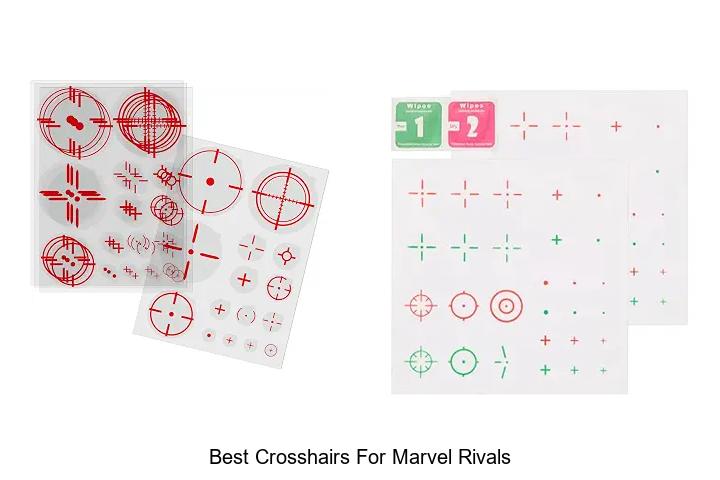
Pick 2  | Aim Sight Assist Sticker 2 Pack | Check Price On Amazon |
Pick 3  | Aim Assist Stickers | Check Price On Amazon |
1. Transparent Crosshair Target Stickers 120PCS
Tiny crosshair decals can add simple aiming cues across many screens. The 120-piece set gives plenty of options for different games and display sizes. Transparent static cling vinyl keeps the look discreet while offering visible targeting points.
Fifteen designs and sizes from 0.4 inches to 1.0 inch create flexible placement choices. The stickers work on glass, metal, and plastic surfaces, including TVs, monitors, and phones.
Reusable construction makes removal easier and leaves no marks behind. That makes setup simple for players who like changing their aim point often. Build quality centers on lightweight vinyl rather than rigid hardware.
The pieces are made for indoor gaming use and carry a modern style. Performance depends on placement, but the set gives precise sight alignment options.
It suits FPS players who want many crosshair styles in one pack.
Pros
- Large 120-piece pack offers many aiming options.
- Transparent design stays discreet on screens.
- Reusable static cling makes removal easy.
Cons
- Only fits users who want sticker-based crosshairs.
- Small sizes may need careful placement.
- Performance depends on screen position and preference.
Who Should Buy It?
Players who want many crosshair choices in one pack should consider it. It suits FPS gamers using TVs, monitors, or mobile phones. The reusable static cling design also helps people who change setups often.
Buyers who like discreet, transparent aiming guides may appreciate the low-profile look. It fits adults who want flexible targeting aids across different games and screens.
Key Specifications
| Specification | Details |
|---|---|
| Brand | GSCWLD |
| Pieces | 120 |
| Size Range | 0.4″-1.0″ |
| Material | Static Cling Vinyl |
| Surface Recommendation | Glass, Metal, Plastic |
| Reusable | Yes |
| Pattern | Animal Print, Argyle, Cartoon, Floral, Geometric, Heart, Leaf, Letter Print, Marble, Number, Paisley, Polka Dot, Solid, Star, Striped |
| Style | Modern |
| Compatible Devices | TV Monitors, Computer Screens, Mobile Phones |
| Mounting Type | Static Cling |
The pack includes 120 static cling vinyl decals in transparent finish. Sizes range from 0.4 inches to 1.0 inch, so users can match different screen setups. The stickers suit glass, metal, and plastic surfaces, including monitors and phones. Fifteen designs give many placement choices for FPS aiming. The modern style keeps the decals visually simple. For everyday use, that means easy swapping between screens without permanent marks or adhesive residue.
These specifications favor players who change games or devices often. Static cling mounting helps removal and repositioning without extra tools. The reusable material also supports repeated use across indoor setups. The variety of patterns and sizes can help different aiming preferences, from small center points to larger guides. People who use multiple displays get the most benefit, since the stickers work on TVs, computers, and mobile phones with the same basic application method.
2. Aim Sight Assist Sticker 2 Pack
For players who want a simple aiming aid, this two-pack keeps setup straightforward. The transparent stickers add a fixed center point without changing screen content much.
Aim Sight Assist Sticker 2 Pack suits fast target tracking across many FPS games. The dual-color set includes red and green options, with 56 pieces ranging from 1 cm to 2 cm.
That size spread helps match different screen setups and play styles. The material is made for heat exposure from devices, and the stickers are designed for clear visibility in bright or dark rooms. They apply to TV monitors, mobile phones, laptops, and gaming console screens, then remove cleanly without residue or damage.
Reusability makes them practical for players who switch devices often. Build quality sounds simple but useful, with a lightweight form that should not distract during play. For the money, the two-pack format gives extra flexibility for backups or different devices.
It suits budget-minded players who want a low-commitment aiming aid for casual FPS sessions.
Pros
- Two-pack offers extra stickers for backups.
- Red and green colors improve visibility choices.
- Works on many screen types and devices.
Cons
- Only helps with crosshair placement, not aim skill.
- Sticker sizes may not suit every display.
- Manual placement may take a few tries.
Who Should Buy It?
Buyers who want a low-cost aiming aid will like this set. It fits players using monitors, phones, laptops, or console screens. The two-color and multi-size pack works well for different screen sizes and lighting conditions.
It also suits anyone who wants removable stickers without screen residue. Players who prefer simple hardware-based aiming markers may find it useful for FPS games.
Key Specifications
| Specification | Details |
|---|---|
| Brand | Aim Sight Assist Sticker |
| Pieces | 56 pieces |
| Size Range | 1 cm to 2 cm |
| Material | Durable sticker material |
| Surface Recommendation | TV monitor, mobile phone screen, laptop display, gaming console screen |
| Reusable | Yes |
| Pattern | Transparent clear crosshair, dual color |
| Style | Upgraded transparent clear crosshair sticker |
| Compatible Devices | TV monitor, mobile phone, laptop, gaming console |
| Mounting Type | Sticker |
The 56-piece pack gives many placement options for different screens. Sizes from 1 cm to 2 cm help users match small or large display areas. The transparent clear crosshair pattern keeps the center marker visible without covering much of the screen. Red and green color choices add flexibility for different lighting conditions. Because the stickers are reusable, users can move them between devices or replace worn placements without needing a new setup.
These specifications matter most for players who use multiple devices. TV monitors, phones, laptops, and console screens are all listed as supported surfaces. That wide compatibility helps when switching between gaming setups at home or on the go. The sticker mounting type keeps installation simple, while the durable material is meant to handle device heat. Players who want a removable aiming marker with low visual clutter may benefit most from these features.
3. Aim Assist Stickers
Small crosshair decals can change a screen setup fast. These transparent stickers focus on simple aiming help without blocking the display.
The Aim Assist Stickers pack includes 90 static cling crosshairs in 15 designs. Sizes range from 0.39 inches to 1 inch, so placement feels flexible across different screens.
The clear vinyl keeps visuals visible while adding a centered aiming point. That makes the set appealing for FPS players who want basic screen markers.
Build quality stays practical and lightweight, with static cling vinyl used throughout. The stickers attach without adhesive, so removal should leave no residue behind.
Reusability also helps when changing screens or adjusting placement. Compatibility covers TVs, mobile phones, and gaming monitors made from glass or plastic.
The round, transparent design keeps the look understated during play. For low-cost basics, it suits gamers who want simple crosshair markers and easy setup rather than complex accessories.
Pros
- Large 90-piece set with 15 crosshair designs
- Static cling vinyl leaves no adhesive residue
- Works on TVs, phones, and monitors
Cons
- Small sizes may suit only certain setups
- Clear stickers may be hard to place precisely
- Basic design offers limited customization
Who Should Buy It?
Buyers wanting simple crosshair markers for FPS play should consider these. They suit players who want a low-cost, reusable option for TVs, phones, or monitors. The transparent design works well for basic aiming help without changing the screen much.
They also fit anyone who prefers easy removal and a wide range of sticker sizes.
Key Specifications
| Specification | Details |
|---|---|
| Brand | GSCWLD |
| Pieces | 90 |
| Size Range | 0.39″-1″ |
| Material | Static Cling Vinyl |
| Surface Recommendation | Glass, Plastic |
| Reusable | Yes |
| Pattern | Crosshair |
| Style | Modern |
| Compatible Devices | Computer, Mobile, TV |
| Mounting Type | Static Cling |
The 90-piece set gives many placement options across different screens. Sizes from 0.39 inches to 1 inch let users match small or larger viewing areas. Static cling vinyl means the stickers stick without glue. Glass and plastic surfaces work best, including computers, mobiles, and TVs. The crosshair pattern stays transparent, so the screen remains visible during use. That makes the stickers practical for simple aiming support without bulky hardware.
Reusable static cling material matters during daily use and setup changes. Users can remove and reposition the stickers without residue on compatible surfaces. That helps when testing different screen spots or switching devices. The modern round style keeps the look clean and low-key. FPS gamers who want basic monitor markers may benefit most. The mix of sizes and device compatibility gives flexibility for casual play across home setups and mobile screens.
4. TACFUN 4×32 Crossbow Scope

Compact crossbow optics can make fast aiming feel simpler and steadier. The TACFUN 4X32 combines a 4x magnification with a multi-range reticle for quick target pickup.
Built from a single piece of T6 6061 aluminum, it also brings fog proof and shock resistant construction. The nitrogen purged, O-ring sealed housing helps protect the internals, while the blue fused, multi-coated lens supports clear light transmission and scratch resistance.
At 8.5 inches long and 11.5 ounces, it stays compact and easy to mount. The included 1-inch Picatinny and Weaver rings, plus lens covers, add convenience right out of the box.
Red and green illumination gives extra visibility in changing light. Its 3-inch eye relief and 36.6-foot field of view suit close-range use and quick alignment.
Buyers wanting crossbow-specific optics with simple setup and durable construction will find strong value here.
Pros
- Compact size suits fast target acquisition
- Includes Picatinny and Weaver rings
- Dual-color illumination helps in low light
Cons
- Fixed 4x magnification limits flexibility
- Designed for crossbows, not general optics
- Field of view suits closer distances better
Who Should Buy It?
Buyers wanting crossbow-specific optics should consider this scope. It fits users who value a compact body, simple mounting, and illuminated aiming points. The included rings and lens covers help with setup and protection.
It suits close-range shooting where quick target pickup matters more than variable magnification. Hunters who want a lightweight aluminum scope with red and green illumination will find it practical.
Key Specifications
| Specification | Details |
|---|---|
| Brand | TACFUN |
| Pieces | 1 |
| Size Range | 4x32mm |
| Material | Aluminum |
| Surface Recommendation | Lens covers included |
| Reusable | Yes |
| Pattern | Multi range reticle |
| Style | Crossbow compact scope |
| Compatible Devices | Cross Bow |
| Mounting Type | Picatinny/Weaver |
The 4×32 size means fixed four-power magnification with a 32 millimeter objective lens. In everyday use, that setup supports steady aiming at closer distances. The 3-inch eye relief helps place your eye comfortably behind the scope. A 36.6-foot field of view also gives a wider look at the target area. The 1/4 MOA adjustment value points to finer aiming control for users who want small changes.
The aluminum body and 8.5-inch length keep the scope compact and light. At 11.5 ounces, it adds less bulk to the crossbow setup. Fog proof, shock resistant, nitrogen purged, and O-ring sealed construction helps it handle rough weather and repeated use. The blue fused, multi-coated, scratch resistant lens supports clear viewing, while red and green illumination helps visibility in dim conditions. Crossbow users who want quick setup may like the included rings.
5. 60PCS Fast Scope Monitor Decal

Tiny aiming decals can add a quick visual reference without much fuss. That makes this 60-piece set appealing for players who want a simple monitor aid. The package includes transparent vinyl decals in 15 designs, with sizes from 0.4 to 1.0 inches.
They are made for FPS games, but also suit TVs, computer screens, and mobile phones. The clear finish keeps the stickers discreet while still giving a visible center point.
Their free-form shape and minimalist style keep the look clean on most displays.
The main strength is variety. You get multiple aiming options, so different games and screen setups can use different decals. Application is straightforward, and the stickers can be removed when needed.
That makes them easy to try without a complex setup. The vinyl material and transparent finish fit indoor use on plastic or glass surfaces.
For players on the smallest budget, the value comes from quantity and flexibility. It suits FPS players who want a low-effort aiming guide across several devices.
Pros
- Sixty decals give plenty of placement choices.
- Clear vinyl keeps the crosshair subtle on-screen.
- Works on monitors, phones, and TVs.
Cons
- Only helpful for players who like screen stickers.
- Small sizes may suit some games better than others.
- No adhesive reusability details are listed.
Who Should Buy It?
Buy it if you want a very simple aiming aid across several screens. It suits FPS players who like experimenting with different crosshair sizes and designs. The set also fits people using a TV, computer monitor, or phone for gaming.
Budget-minded buyers will get the most use from the 60-piece assortment and easy removal.
Key Specifications
| Specification | Details |
|---|---|
| Brand | GSCWLD |
| Pieces | 60 |
| Size Range | 0.4″-1.0″ |
| Material | Vinyl |
| Surface Recommendation | Plastic, Glass |
| Reusable | No data |
| Pattern | Crosshair, Gaming Symbols, Scope |
| Style | Minimalist |
| Compatible Devices | Computer, Mobile, TV |
| Mounting Type | Adhesive |
The set includes 60 transparent vinyl decals in 15 designs. Sizes range from 0.4 inches to 1.0 inch. That range matters because smaller decals suit tighter aiming references, while larger ones are easier to spot quickly. The clear finish helps the stickers blend into a screen without adding heavy visual clutter. Since they are meant for plastic and glass, they fit common gaming displays and mobile screens used indoors.
In daily use, the variety gives flexibility across different games and screen sizes. A player can place a smaller decal for subtle guidance or use a larger one for easier center aiming. Vinyl material keeps the decals light and thin, which helps them sit flat on the display. The adhesive mounting style supports quick setup, while the minimalist pattern keeps distractions low. Players who switch between devices may benefit most from that simple format.
6. Cosmos Fast Scope Monitor Decal

Tired of losing your aim point during fast matches? These monitor decals add a simple center reference for FPS play.
Cosmos includes 50 vinyl stickers in assorted styles and sizes from 1 to 2 centimeters. The pack is made for screens, TVs, and mobile phones, with 21 designs across two sheets.
The clear target shape is meant for darker scenes and brighter scenes alike. Each sticker aims to support more accurate shots and better motion control.
Vinyl construction helps it handle machine heat during longer sessions. The adhesive is designed to remove cleanly and leave no residue. That makes it easier to keep a monitor clean when gaming ends.
The assorted sizes suit different displays and personal aiming preferences. Setup is straightforward, and the reusable format adds flexibility for shared devices.
It suits FPS players who want a low-fuss sight marker without permanent changes. It also fits gamers who prefer experimenting with different crosshair shapes.
Pros
- 50 stickers offer plenty of backups and variety.
- Clean removal leaves monitors ready for other uses.
- Multiple sizes suit different screens and preferences.
Cons
- Adhesive stickers may not suit every player.
- Crosshair shape changes depend on sticker placement.
- Vinyl decals are simpler than software crosshairs.
Who Should Buy It?
Buyers who want a low-commitment aiming aid should like this pack. It suits FPS players using monitors, TVs, or mobile phones. The assorted sizes and 21 designs help different play styles.
Shared setups also benefit, since the stickers remove cleanly. Players who want a physical crosshair instead of software changes may prefer it most.
Key Specifications
| Specification | Details |
|---|---|
| Brand | Cosmos |
| Pieces | 50 |
| Size Range | 1 cm to 2 cm |
| Material | Vinyl |
| Surface Recommendation | TV monitor and mobile phone |
| Reusable | Yes |
| Pattern | Crosshair |
| Style | Assorted styles |
| Compatible Devices | Smartphone |
| Mounting Type | Weaver Mount |
Cosmos supplies fifty vinyl decals in assorted styles and sizes. The stickers range from 1 centimeter to 2 centimeters, which helps match different screens. That size spread matters in daily use, since smaller targets suit compact displays. Larger targets can feel easier to spot on bigger monitors. The pack also works on TV monitors and mobile phones. Each decal uses a crosshair pattern, so the aiming point stays simple and direct during play sessions.
Vinyl material makes the decals light and easy to place. The reusable design helps when a sticker needs repositioning or removal. Clean removal matters for people who also use the screen for videos. The mounting type is listed as Weaver Mount, while the compatible device data includes smartphones. That mix suggests flexible use across multiple setups. Players who switch between screens may value the assorted pack most, especially when testing different target sizes and placements.
7. OSIGHT R Red Dot Sight

A crisp window and multiple reticle choices make this sight feel fast and precise. It is built for users who want a premium optic with flexible aiming options.
The OSIGHT R uses a 2 MOA dot, 65 MOA circle, or both together. That setup supports quick target pickup and finer aiming for different distances.
The clear 1.10 x 0.87 inch window gives a wide view, while anti-glare lens treatment helps reduce distortion and starburst. Its enclosed 7075-T6 aluminum housing adds durability, and IPX8 waterproofing helps protect it in harsh conditions. Motion activation wakes it with movement, then sleep mode saves power after inactivity.
Setup should feel straightforward for anyone using the Micro T1/T2 footprint. It includes a 1.535-inch lower 1/3 co-witness mount, protective lens covers, ARD, and a battery.
The side-load battery design helps simplify changes without disturbing the whole optic. Twelve brightness levels, including night vision settings, give plenty of control for different lighting.
It suits users who want dependable protection, quick acquisition, and a refined optic feel for demanding play or training.
Pros
- Large viewing window supports fast target acquisition
- Multiple reticle modes improve aiming flexibility
- Durable enclosed housing and waterproofing
Cons
- Accessory riser mounts are sold separately
- Heavier than some compact red dots
- Brightness options may feel complex at first
Who Should Buy It?
Buy this if you want a premium enclosed optic with flexible reticle options. It suits users who value a wide window, strong housing, and easy mounting on a Micro T1/T2 footprint. The motion activation and long battery life also help people who want less upkeep.
It fits players or shooters who want clear sight picture control and dependable protection.
Key Specifications
| Specification | Details |
|---|---|
| Brand | Osight |
| Pieces | 1 |
| Material | Aluminum |
| Style | Red Dot |
| Compatible Devices | Micro T1/T2 footprint |
| Mounting Type | Micro T1/T2 Footprint |
The Osight brand models this optic as a red dot sight with one included unit. Aluminum construction gives the housing a solid feel without adding unnecessary bulk. The Micro T1/T2 footprint matters because it matches common mounting setups. In everyday use, that means simpler compatibility checks and fewer surprises during installation. The red dot style keeps aiming straightforward, while the single-piece package suits users who want a ready-to-mount optic.
These specifications point to a sturdy optic made for practical setup. Aluminum helps the sight handle repeated use, while the Micro T1/T2 mount type supports broader compatibility. A single included piece also keeps the kit focused and easy to manage. Users who want simple installation, durable materials, and a familiar mounting pattern benefit most. It should appeal to people who value reliability and a clean setup over extra accessories.
8. EZshoot Red Green Dot Sight Reflex Sight

A wide lens and multiple reticles make aiming feel quick and flexible. EZshoot built this reflex sight for fast target pickup and simple adjustment. It uses a 22x33mm lens for an ultra-wide view and unlimited eye-relief for easier alignment.
The sight offers four reticles and five illumination levels, so visibility stays usable across different lighting conditions. Windage and elevation clicks use Allen head screws with a locking screw for steadier setup.
Its aluminum body adds durability without excessive weight. The matte black finish keeps the look simple and practical.
A standard Picatinny mount makes installation straightforward on compatible gear. For players who want an all-around sight feel, it suits fast tracking and varied aiming styles.
Pros
- Wide reflex lens supports quick target acquisition
- Four reticles suit different aiming preferences
- Aluminum body feels durable and practical
Cons
- Only one magnification level
- Requires Picatinny mounting compatibility
- Small lens may feel limited for some users
Who Should Buy It?
Buy this if you want a flexible reflex-style sight with multiple reticles and brightness settings. It suits players who value quick target acquisition, simple mounting, and a clear sight picture. The unlimited eye-relief and wide lens help with fast aiming changes.
It fits users who want one sight that handles different lighting conditions and aiming preferences without much fuss.
Key Specifications
| Specification | Details |
|---|---|
| Brand | EZshoot |
| Pieces | 1 |
| Size Range | 22x33mm lens |
| Material | Aluminum |
| Pattern | Dot, Cross, 10 MOA, and 3 MOA |
| Style | Red Dot Sight |
| Compatible Devices | Shotgun, Handgun, Rifle |
| Mounting Type | Picatinny Mount |
The 22x33mm reflex lens gives a broad viewing window for fast aiming. Unlimited eye-relief means your eye position stays less restrictive during use. Four reticle choices let you match the aiming mark to different preferences. Five illumination settings help keep the reticle visible in brighter or dimmer conditions. The aluminum build adds a solid feel while staying fairly light. The standard Picatinny base supports mounting on compatible setups with less hassle.
These specifications favor quick acquisition and flexible setup during active use. The parallax correction helps keep the aiming point steadier as position changes. Allen head windage and elevation clicks allow small adjustments for better alignment. A locking screw helps hold those settings in place. The 1x magnification keeps the sight simple for close-range aiming. Players who want fast target tracking and easy adjustment will benefit most from these features.
9. CVLIFE 3-9×40 Optics Scope

Budget-minded players get a simple scope with useful zoom flexibility. The CVLIFE 3-9×40 Optics Scope focuses on straightforward aiming support and practical setup.
Its 3-9x magnification range gives room for closer and farther targets. The 40mm class objective helps gather light for clearer sighting.
An R4 crosshair reticle keeps aiming reference lines easy to follow. The Flat Dark Earth finish gives it a muted, tactical look.
Aluminum construction keeps the body light at about 0.3 kilograms. The included Picatinny mount also helps simplify installation on compatible rifles.
Its 12.20-inch length keeps the profile manageable on the gun. That makes it a solid match for players wanting budget-friendly hardware.
It suits users who want basic magnification without extra complexity. The crosshair style is straightforward, so setup feels approachable for beginners.
The field of view and zoom range support practical target tracking. Overall, it offers sensible features for users prioritizing function over extras.
Pros
- Three-to-nine power zoom range adds flexibility.
- Light aluminum build keeps weight low.
- Picatinny mount is included for setup.
Cons
- Objective lens is smaller than many larger scopes.
- Field of view may feel limited.
- Basic crosshair style offers few advanced aiming aids.
Who Should Buy It?
Players who want a simple budget scope should consider it. It suits someone seeking basic zoom control and a crosshair reticle. The included mount helps users who want less setup hassle.
Its lightweight aluminum body also appeals to those avoiding bulky gear. It fits best with users who value practicality, not advanced optics features.
Key Specifications
| Specification | Details |
|---|---|
| Brand | CVLIFE |
| Pieces | 1 |
| Size Range | 3-9×40 |
| Material | Aluminum |
| Pattern | Crosshair |
| Style | Crosshair |
| Compatible Devices | Rifle |
| Mounting Type | Picatinny Mount |
The 3-9x magnification range means the view can zoom from closer targets to farther ones. The 40mm objective lens, listed as 1.57 inches, helps the scope collect light for clearer sightlines. A 12.20-inch length keeps the unit compact enough for balanced handling. The 0.3-kilogram weight also helps reduce front-end bulk. These measurements suit users who want flexible aiming without a heavy setup. The crosshair reticle gives a simple reference point for lining up shots quickly.
An aluminum body usually helps keep weight down while staying practical for regular use. The Picatinny mount supports straightforward attachment on compatible rifles. A 14-foot field of view gives a defined look at the target area. The flat dark earth color and lens finish give a low-profile appearance. These details favor users who want easy mounting, moderate zoom, and manageable size. It should suit a range of setups where simple, dependable aiming matters more than extras.
10. CVLIFE EagleFeather 40mm Red/Green Dot Magnifier Combo

Bright reticle choices and 3X magnification make aiming feel more flexible. The combo suits players who want a clearer sight picture at range.
CVLIFE pairs a 40mm red dot sight with a flip-to-side magnifier. The sight offers four reticle options and eight brightness levels.
Dot, circle-dot, crosshair-dot, and crosshair-circle-dot patterns cover different preferences. The 2.36-inch eye relief adds a more comfortable viewing position.
A broad 40mm lens and coated glass help reduce glare. The parallax-corrected design also supports steadier aim across varied distances. Build quality leans practical, with aluminum construction, waterproofing, fogproofing, and shock resistance.
The Picatinny mount and absolute co-witness height work with compatible setups. Diopter adjustment on the magnifier helps sharpen the image quickly. Setup suits users who want more distance detail without losing close-range speed.
It fits best for players wanting one sight system with flexible aiming.
Pros
- Four reticle choices fit different aiming preferences
- 3X magnifier adds clarity at longer distances
- Aluminum build feels durable and lightweight
Cons
- Only fits absolute co-witness setups
- May feel bulky on smaller builds
- Magnifier setup adds extra adjustment steps
Who Should Buy It?
People who want a red dot and magnifier in one setup should consider it. It suits users who prefer multiple reticle patterns and adjustable brightness. The 40mm lens, 3X magnification, and comfortable eye relief help with clearer aiming.
It also fits buyers who want a Picatinny-mounted option with added durability for regular use.
Key Specifications
| Specification | Details |
|---|---|
| Brand | CVLIFE |
| Pieces | 2 |
| Size Range | 40mm |
| Material | Aluminum |
| Surface Recommendation | Picatinny rail |
| Reusable | Yes |
| Pattern | Crosshair/Dot |
| Style | Red Dot |
| Compatible Devices | Rifle |
| Mounting Type | Picatinny Mount |
The 40mm lens gives a wider view through the sight. A broader window helps keep targets and surroundings visible. Three times magnification adds detail at longer distances. The four reticle choices change how the aiming point appears. Brightness levels can be adjusted for sunlight or dusk. The 2.36-inch eye relief also supports a more comfortable viewing position. Together, these details suit players who want flexibility in different lighting and distance situations.
Aluminum construction keeps the combo light while staying sturdy. Waterproof, fogproof, and shockproof features help it handle rough conditions. The Picatinny mount supports simple attachment on compatible setups. Absolute co-witness height matters for users matching the right sight layout. The magnifier includes diopter adjustment, which helps fine-tune focus. That makes setup easier for users who want a sharper image and steadier aiming. It benefits players who value durability and a clean, adjustable sight picture.
Best Crosshairs for Marvel Rivals: Find the Perfect Aim Style for Every Hero
Crosshair visibility and contrast
Color choice can make a crosshair far easier to track across different map backgrounds. In fast matches, a reticle that blends into bright walls, dark corridors, or busy combat scenes can slow reaction time and make aim feel inconsistent. A well-contrasted color stands out clearly in every environment, while the right thickness and opacity help the shape stay visible without blocking the target. This matters even more during intense fights, where explosions, ability effects, and screen flashes can briefly hide a faint reticle.
This matters even more during intense fights, where explosions, ability effects, and screen flashes can briefly hide a faint reticle. A crosshair with strong visibility, balanced line weight, and just enough transparency gives cleaner focus and faster tracking from one engagement to the next.
Shape and size preferences
Reticle style affects both target visibility and precision, so the shape you use can change how quickly you track enemies and line up shots in fast-paced matches. Dot, cross, circle, and hybrid designs each offer a different balance of clarity and screen coverage, while center gap and line length influence how much of the target remains visible during aim adjustments. Small reticles usually feel cleaner and less distracting, but larger ones can be easier to spot in chaotic fights and may suit players who need a stronger visual reference.
Small reticles usually feel cleaner and less distracting, but larger ones can be easier to spot in chaotic fights and may suit players who need a stronger visual reference. Any setup should also support device compatibility and future adjustments, because a design that works well now may need fine-tuning later as your display, resolution, or playstyle changes. Keeping these points in mind helps you avoid a reticle that feels cramped, oversized, or awkward during intense gameplay.
- Dot, cross, circle, or hybrid styles: Each shape changes how much of the target stays visible.
- Center gap and line length: These details determine accuracy cues and overall screen clutter.
- Small vs. large reticle scaling: Size affects both focus and visibility across different game situations.
Customization and adjustability
Color tuning and brightness settings have a direct impact on how clearly a crosshair stands out against Marvel Rivals’ fast-moving, high-contrast visuals, especially during chaotic fights and bright ability effects. A setup that supports flexible display controls makes it easier to keep the reticle visible without straining your eyes, while also helping you fine-tune it for different maps and lighting conditions.
Dynamic vs. static crosshair options matter just as much, since dynamic styles can reflect movement or firing behavior, while static designs offer consistent precision for players who prefer a steady aiming reference. It is also worth paying attention to spread indicators and recoil cues, because these features give instant feedback on accuracy, weapon bloom, and shot recovery, making it simpler to track aim performance and adjust your playstyle in real time.
Hero role and playstyle fit
Hero role and aim style need to match the crosshair setup because support, damage, and tank characters all rely on different sightlines and target sizes during matches. Support heroes often benefit from a clear, uncluttered reticle that makes healing and utility shots easier to place, while damage heroes may need a sharper center point for fast target swaps.
Range also changes what works best, since close-range brawlers often perform better with a wider reticle that is easy to follow during fast movement, while long-range attackers usually need a smaller, more precise aim point for consistent accuracy. It also helps to match the reticle style to the aiming method: tracking-focused players tend to prefer a crosshair that makes smooth target following easier, while flick-focused players usually benefit from a design that gives a quick and obvious center reference. Taking these details into account ensures the setup supports the hero type and the way the player naturally aims, which leads to more reliable performance in every fight.
Screen and resolution compatibility
Screen and resolution compatibility matters because a reticle that feels precise on one display can appear too large, too small, or slightly shifted on another. Support for 1080p, 1440p, and ultrawide setups helps ensure the on-screen marker stays consistent across common monitor types, while aspect ratio can change how the reticle is perceived and how naturally it lines up with targets. It is also worth checking UI scaling and monitor size support, since a crosshair that works well on a compact screen may need adjustment on a larger display to remain clear and readable during fast movement.
A setup that handles different resolutions and screen formats smoothly gives you a more stable aim reference and reduces the chance of visual distractions in competitive play.
Comfort and competitive practicality
Clear visibility plays a major role in maintaining steady aim during long matches, because a crosshair that is easy on the eyes helps reduce fatigue and keeps focus sharp from the first round to the last. A well-designed overlay should stay subtle enough to avoid blocking enemies or cluttering the screen, yet remain distinct enough to track quickly in fast-paced fights.
The ideal setup also strikes a smart balance between style and performance, giving players a look they enjoy without adding visual noise that can slow reaction time. In competitive play, that mix matters just as much as accuracy, since comfort and readability often decide whether a tool feels helpful or distracting.
- Lower eye strain: softer, clearer visuals support longer sessions with less fatigue.
- Less obstruction: a clean design keeps the center of the screen visible during combat.
- Better balance: a crosshair can still look distinctive without hurting focus or speed.
Keep Your Crosshair Clean and Clear
A good crosshair can make aiming feel more comfortable in Marvel Rivals. Since it is on-screen all the time, small problems can add up fast. A messy setup can be harder to read during a match.
Care is simple. Keep the crosshair easy to see without making it distracting. Bright colors can help, but very bright styles may blend into certain maps or effects. A clean shape with a clear center often works best for many players.
It also helps to save a few presets. One can work for close fights, while another may suit longer-range shots. That way, you can swap styles without changing settings from scratch every time.
Try to avoid constant changes. Switching often can make it harder to build muscle memory. Give a new style some time before deciding whether it fits your play style.
Here are a few simple care tips:
- Check visibility in bright and dark areas.
- Keep the size small enough to avoid blocking targets.
- Use a color that stands out from the map.
- Save backup settings before making big changes.
- Revisit your setup after hero swaps or updates.
Crosshair settings do not wear out like hardware, but your needs can change over time. When a style starts to feel busy, hard to track, or less useful, it may be time to tweak it. Small updates can keep your aim setup feeling fresh and easy to use.
FAQ’s
What Are The Best Crosshair Settings For Different Heroes In Marvel Rivals?
The best crosshair settings in Marvel Rivals depend on the hero’s role: use a small, precise crosshair for aim-heavy heroes like Iron Man or Hawkeye, and a slightly larger, more visible one for close-range or spray-based heroes like Scarlet Witch or Rocket Raccoon. In general, keep the crosshair clean, centered, and adjustable so you can match it to each hero’s weapon spread and firing style.
How Do I Change And Customize Crosshairs In Marvel Rivals?
Open **Settings** in Marvel Rivals, then go to the **Crosshair/Reticle** options to adjust things like shape, size, color, opacity, and outline. You can also save different crosshair presets if you want separate setups for different heroes or playstyles.
Which Crosshair Styles Work Best For Aim-Heavy Characters In Marvel Rivals?
For aim-heavy characters in Marvel Rivals, small, clean crosshairs like a simple dot or a thin static cross work best because they keep your target visible and precise. Avoid overly large or distracting styles, since they can make tracking heads and weak points harder.
What Crosshair Color And Size Are Easiest To See In Marvel Rivals Matches?
Bright neon colors like cyan, lime green, or magenta are usually easiest to see in Marvel Rivals matches because they stand out against most maps and effects. A medium-sized crosshair is best for visibility without blocking your target.
Are There Pro Player Crosshair Settings I Can Copy For Marvel Rivals?
Yes—many pro players share their Marvel Rivals crosshair settings, and you can copy them as a strong starting point. Just remember to tweak them a bit for your own comfort and aim style.
Final Verdict
For buyers who want the most flexible option, Transparent Crosshair Target Stickers 120PCS is the strongest all-around pick among the best crosshairs for marvel rivals. Its larger set gives plenty of room to experiment with different reticle styles and screen placements, which suits players who want variety without paying a premium. 60PCS Fast Scope Monitor Decal is the budget-friendly choice for anyone who wants a simple, low-cost way to improve aim reference points without spending much.
For a more polished hardware-style setup, OSIGHT R Red Dot Sight is the premium pick, aimed at players who want the feel and look of higher-end optics. EZshoot Red Green Dot Sight Reflex Sight is the best choice for real sight setups, offering the most balanced option for players who want an all-around reflex sight experience rather than a sticker-based solution. Each pick matches a different type of buyer, from budget shoppers to players who want a more authentic sight.
Choose Transparent Crosshair Target Stickers 120PCS for versatility, 60PCS Fast Scope Monitor Decal for the lowest price, or a reflex sight if you want a real optic-style setup.